AWS

Introduction to Amazon Glacier Service

Introduction to Amazon Glacier Service this is the blog topic in that you will learn S3 and Glacier Select, Amazon Glacier, Storage Pricing & Other Storage-Related Services like Amazon Elastic File System, AWS Storage Gateway, AWS Snowball etc

S3 and Glacier Select

AWS provides a different way to access data stored on either S3 or Glacier: Select. The feature lets you apply SQL-like queries to stored objects so that only relevant data from within objects is retrieved, permitting significantly more efficient and cost-effective operations. One possible use case would involve large CSV files containing sales and inventory data from multiple retail sites. Your company’s marketing team might need to periodically analyse only sales data and only from certain stores. Using S3 Select, they’ll be able to retrieve exactly the data they need—just a fraction of the full data set—while bypassing the bandwidth and cost overhead associated with downloading the whole thing.

Related Products:– AWS Certified Solutions Architect | Associate

Amazon Glacier

At first glance, Glacier looks a bit like just another S3 storage class. After all, like most S3 classes, Glacier guarantees 99.999999999 percent durability and, as you’ve seen, can be incorporated into S3 lifecycle configurations.Nevertheless, there are important differences. Glacier, for example, supports archives as large as 40 TB rather than the 5 TB limit in S3. Its archives are encrypted by default, while encryption on S3 is an option you need to select; and unlike S3’s “human-readable” key names, Glacier archives are given machine-generated IDs. But the biggest difference is the time it takes to retrieve your data. Getting the objects in an existing Glacier archive can take a number of hours, compared to nearly instant access from S3. That last feature really describes the purpose of Glacier: to provide inexpensive long-term storage for data that will be needed only in unusual and infrequent circumstances.

Storage Pricing

To give you a sense of what S3 and Glacier might cost you, here’s a typical usage scenario. Imagine you make weekly backups of your company sales data that generate 5 GB archives. You decide to maintain each archive in the S3 Standard Storage and Requests class for its first 30 days and then convert it to S3 One Zone (S3 One Zone-IA), where it will remain for 90 more days. At the end of those 120 days, you will move your archives once again, this time to Glacier, where it will be kept for another 730 days (two years) and then deleted.Once your archive rotation is in full swing, you’ll have a steady total of (approximately) 20 GB in S3 Standard, 65 GB in One Zone-IA, and 520 GB in Glacier. Table 3.3 shows what that storage will cost in the US East region at rates current at the time of writing.

Of course, storage is only one part of the mix. You’ll also be charged for operations including data retrievals; PUT, COPY, POST, or LIST requests; and lifecycle transition requests. Full, up-to-date details are available at https://aws.amazon.com/s3/pricing/.

Other Storage-Related Services

It’s worth being aware of some other storage-related AWS services that, while perhaps not as common as the others you’ve seen, can make a big difference for the right deployment.

 Amazon Elastic File System

 The Elastic File System (EFS) provides automatically scalable and shareable file storage. EFS-based files are designed to be accessed from within a virtual private cloud (VPC) via Network File System (NFS) mounts on EC2 instances or from your on-premises servers through AWS Direct Connect connections. The object is to make it easy to enable secure, low-latency, and durable file sharing among multiple instances.

Also Read:– Amazon simple storage service Lifecycle

AWS Storage Gateway

Integrating the backup and archiving needs of your local operations with cloud storage services can be complicated. AWS Storage Gateway provides software gateway appliances (based on VMware ESXi, Microsoft Hyper-V, or EC2 images) with multiple virtual connectivity interfaces. Local devices can connect to the appliance as though it’s a physical backup device like a tape drive, while the data itself is saved to AWS platforms like S3 and EBS.

Read More : https://www.info-savvy.com/overview-of-amazon-glacier-service/

————————————————————————————————————

This Blog Article is posted byInfosavvy, 2nd Floor, Sai Niketan, Chandavalkar Road Opp. Gora Gandhi Hotel, Above Jumbo King, beside Speakwell Institute, Borivali West, Mumbai, Maharashtra 400092

Contact us – www.info-savvy.com

https://g.co/kgs/ttqPpZ

ISO 27001

ISO 27001 Clause 9.2 Internal audit

Activity

ISO 27001 Clause 9.2 Internal audit, The organization conducts internal audits to supply information on conformity of the ISMS to the wants.

Implementation Guideline

Evaluating an ISMS at planned intervals by means of internal audits provides assurance of the status of the ISMS to top management. Auditing is characterized by variety of principles: integrity; fair presentation; due professional care; confidentiality; independence; and evidence-based approach (see ISO 19011). Internal audits provide information on whether the ISMS conform to the organization’s own requirements for its ISMS also on the wants in ISO/IEC 27001.

Related Products:– ISO 27001 Lead Auditor Training & Certification

The organization’s own requirements include:

  1. Requirements stated within the information security policy and procedures;
  2. Requirements produced by the framework for setting Information security objectives, including outcomes of the danger treatment process;
  3. Legal and contractual requirements;
  4. Requirements on the documented information.

Auditors also evaluate whether the ISMS is effectively implemented and maintained. An audit program describes the general framework for a group of audits, planned for specific time frames and directed towards specific purposes. This is often different from an audit plan, which describes the activities and arrangements for a selected audit. Audit criteria are a group of policies, procedures or requirements used as a reference against which audit evidence is compared, i.e. the audit criteria describe what the auditor expects to be in situation. An internal audit can identify nonconformities, risks and opportunities. Nonconformities are managed consistent with requirements. Risks and opportunities are managed consistent with requirements. The organization is required to retain documented information about audit program and audit results.

Managing an audit program

An audit program defines the structure and responsibilities for planning, conducting, reporting and following abreast of individual audit activities. intrinsically it should make sure that audits conducted are appropriate, have the proper scope, minimize the impact on the operations of the organization and maintain the required quality of audits. An audit program should also make sure the competence of audit teams, appropriate maintenance of audit records, and therefore the monitoring and review of the operations, risks and effectiveness of audits. Further, an audit program should make sure that the ISMS (i.e. all relevant processes, functions and controls) is audited within a specified time frame. Finally, an audit program should include documented information about types, duration, locations, and schedule of the audits.The extent and frequency of internal audits should be supported the dimensions and nature of the organization also as on the character , functionality, complexity and therefore the level of maturity of the ISMS (risk-based auditing).The effectiveness of the implemented controls should be examined within the scope of internal audits.An audit program should be designed to make sure coverage of all necessary controls and will include evaluation of the effectiveness of selected controls over time. Key controls (according to the audit program) should be included in every audit whereas controls implemented to manage lower risks could also be audited less frequently. The audit program should also consider that processes and controls should are operational for a few time to enable evaluation of suitable evidence.Internal audits concerning an ISMS are often performed effectively as a neighborhood of, or together with, other internal audits of the organization. The audit program can include audits associated with one or more management system standards, conducted either separately or together. An audit program should include documented information about: audit criteria, audit methods, selection of audit teams, processes for handling confidentiality, information security, health and safety provisions for auditors, and other similar matters.

Competence and evaluation of auditors

Regarding competence and evaluation of auditors, the organization should:

  1. Identify competence requirements for its auditors;
  2. Select internal or external auditors with the acceptable competence;
  3. Have a process in place for monitoring the performance of auditors and audit teams; and
  4. Include personnel on internal audit teams that have appropriate sector specific and knowledge security knowledge.

Auditors should be selected considering that they should to be competent, independent, and adequately trained. Selecting internal auditors are often difficult for smaller companies. If the required resources and competence aren’t available internally, external auditors should be appointed. When organizations use external auditors, they ought to make sure that they have acquired enough knowledge about the context of the organization. This information should be supplied by internal staff.

Also Read:– ISO 27001 Clause 9.1 Performance evaluation Monitoring, measurement, analysis & evaluation

Organizations should consider that internal employees acting as internal auditors are often ready to perform detailed audits considering the organization’s context, but might not have enough knowledge about performing audits. Organizations should then recognize characteristics and potential shortcomings of internal versus external auditors and establish suitable audit teams with the required knowledge and competence.

Performing the audit

When performing the audit, the audit team leader should prepare an audit plan considering results of previous audits and therefore the got to follow abreast of previously reported nonconformists and unacceptable risks. The audit plan should be retained as documented information and will include criteria, scope and methods of the audit.

The audit team should review:

  1. Adequacy and effectiveness of processes and determined controls;
  2. Fulfillment of data security objectives;
  3. Compliance with requirements defined in ISO/IEC 27001:2013, Clauses 4 to 10;
  4. Compliance with the organization’s own information security requirements;
  5. Consistency of the Statement of Applicability against the result of the knowledge security risk treatment process;
  6. Consistency of the particular information security risk treatment plan with the identified assessed risks and therefore the risk acceptance criteria;
  7. Relevance (considering organization’s size and complexity) of management review inputs and outputs;
  8. Impacts of management review outputs (including improvement needs) on the organization.

The extent and reliability of obtainable monitoring over the effectiveness of controls as produced by the ISMS (see 9.1) may allow the auditors to scale back their own evaluation efforts, provided they need confirmed the effectiveness of the measurement methods.If the result of the audit includes nonconformities, the audit should prepare an action plan for every nonconformity to be agreed with the audit team leader.

Read More : https://www.info-savvy.com/iso-27001-clause-9-2-internal-audit/

————————————————————————————————————

This Blog Article is posted byInfosavvy, 2nd Floor, Sai Niketan, Chandavalkar Road Opp. Gora Gandhi Hotel, Above Jumbo King, beside Speakwell Institute, Borivali West, Mumbai, Maharashtra 400092
Contact us – www.info-savvy.com
https://g.co/kgs/ttqPpZ

AWS

Amazon simple storage service Lifecycle

Amazon simple storage service Lifecycle

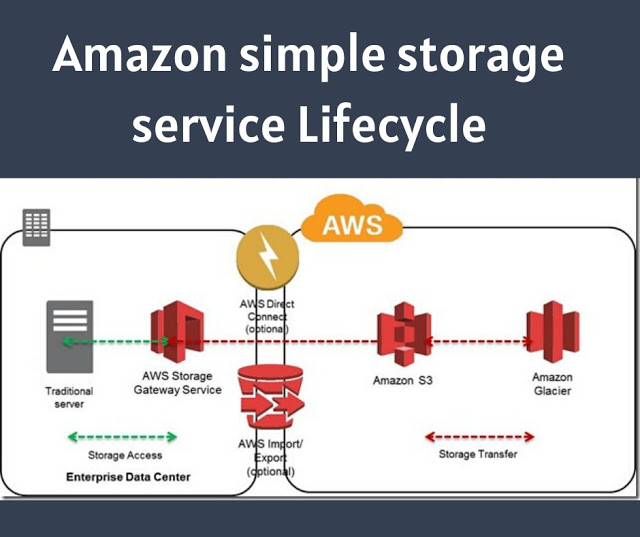
Amazon simple storage service Lifecycle offers more than one class of storage for your objects. The class you choose will depend on how critical it is that the data survives no matter what (durability), how quickly you might need to retrieve it (availability), and how much money you have to spend.

1. Durability

S3 measures durability as a percentage. For instance, the 99.999999999 percent durability guarantee for most S3 classes and Amazon Glacier is as follows:
“. . . corresponds to an average annual expected loss of 0.000000001% of objects.
For example, if you store 10,000,000 objects with Amazon S3, you can on average expect to incur a loss of a single object once every 10,000 years.”
Source: https://aws.amazon.com/s3/faqs
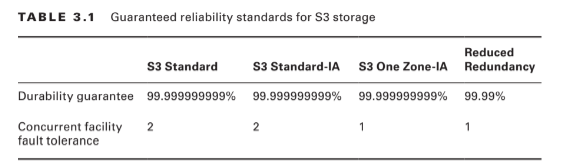
In other words, realistically, there’s pretty much no way that you can possibly lose data stored on one of the standard S3/Glacier platforms because of infrastructure failure. However, it would be irresponsible to rely on your S3 buckets as the only copies of important data. After all, there’s a real chance that a misconfiguration, account lockout, or unanticipated external attack could permanently block access to your data. And, as crazy as it might sound right now, it’s not unthinkable to suggest that AWS could one day go out of business. Kodak and Blockbuster Video once dominated their industries, right? The high durability rates delivered by S3 are largely because they automatically replicate your data across at least three availability zones. That means that even if an entire AWS facility was suddenly wiped off the map, copies of your data would be restored from a different zone. There are, however, two storage classes that aren’t quite so resilient. Amazon S3 One Zone-Infrequent Access (S3 One Zone-IA), as the name suggests, stores data in only a single availability zone. Reduced Redundancy Storage (RRS) is rated at only 99.99 percent durability (because it’s replicated across fewer servers than other classes). You can balance increased/decreased durability against other features like availability and cost to get the balance that’s right for you. All S3 durability levels are shown in Table 3.1.

2. Availability

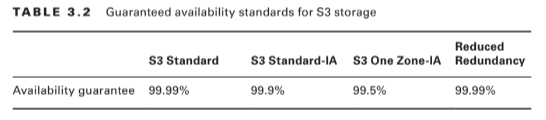
Object availability is also measured as a percentage, this time though, it’s the percentage you can expect a given object to be instantly available on request through the course of a full year. The Amazon S3 Standard class, for example, guarantees that your data will be ready whenever you need it (meaning: it will be available) for 99.99% of the year. That means there will be less than nine hours each year of down time. If you feel down-time has exceeded that limit within a single year, you can apply for a service credit. Amazon’s durability guarantee, by contrast, is designed to provide 99.999999999% data protection. This means there’s practically no chance your data will be lost, even if you might sometimes not have instance access to it. Table 3.2 illustrates the availability guarantees for all S3 classes.

3. Eventually Consistent Data

It’s important to bear in mind that S3 replicates data across multiple locations. As a result, there might be brief delays while updates to existing objects propagate across the system. Uploading a new version of a file or, alternatively, deleting an old file altogether can result in one site reflecting the new state with another still unaware of any changes. To ensure that there’s never a conflict between versions of a single object—which could lead to serious data and application corruption—you should treat your data according to an Eventually Consistent standard. That is, you should expect a delay (usually just two seconds or less) and design your operations accordingly. Because there isn’t the risk of corruption, S3 provides read-after-write consistency for the creation (PUT) of new objects.

Also Read : Amazon Simple Storage Service
Related Product : AWS Certified Solutions Architect | Associate

4. S3 Object Lifecycle

Many of the S3 workloads you’ll launch will probably involve backup archives. But the thing about backup archives is that, when properly designed, they’re usually followed regularly by more backup archives. Maintaining some previous archive versions is critical, but you’ll also want to retire and delete older versions to keep a lid on your storage costs. S3 lets you automate all this with its versioning and lifecycle features.

5. Versioning

Within many file system environments, saving a file using the same name and location as a pre-existing file will overwrite the original object. That ensures you’ll always have the most recent version available to you, but you will lose access to older versions—including versions that were overwritten by mistake. By default, objects on S3 work the same way. But if you enable versioning at the bucket level, then older overwritten copies of an object will be saved and remain accessible indefinitely. This solves the problem of accidentally losing old data, but it replaces it with the potential for archive bloat. Here’s where lifecycle management can help.

6. Lifecycle Management

You can configure lifecycle rules for a bucket that will automatically transition an object’s storage class after a set number of days. You might, for instance, have new objects remain in the S3 Standard class for their first 30 days after which they’re moved to the cheaper One Zone IA for another 30 days. If regulatory compliance requires that you maintain older versions, your fi les could then be moved to the low-cost, long-term storage service Glacier for 365 more days before being permanently deleted.

Accessing S3 Objects

If you didn’t think you’d ever need your data, you wouldn’t go to the trouble of saving it to S3. So, you’ll need to understand how to access your S3-hosted objects and, just as important, how to restrict access to only those requests that match your business and security needs.

7. Access Control

Out of the box, new S3 buckets and objects will be fully accessible to your account but to no other AWS accounts or external visitors. You can strategically open up access at the bucket and object levels using access control list (ACL) rules, finer-grained S3 bucket policies, or Identity and Access Management (IAM) policies. There is more than a little overlap between those three approaches. In fact, ACLs are really leftovers from before AWS created IAM. As a rule, Amazon recommends applying S3 bucket policies or IAM policies instead of ACLs. S3 bucket policies—which are formatted as JSON text and attached to your S3 bucket— will make sense for cases where you want to control access to a single S3 bucket for multiple external accounts and users. On the other hand, IAM policies—because they exist at the account level within IAM—will probably make sense when you’re trying to control the way individual users and roles access multiple resources, including S3. The following code is an example of an S3 bucket policy that allows both the root user and the user Steve from the specified AWS account to access the S3 MyBucket bucket and its contents.

Read More : https://www.info-savvy.com/aws-elastic-block-storage-volumes-and-its-features/

———————————————————————————————————————————-

This Blog Article is posted by

Infosavvy, 2nd Floor, Sai Niketan, Chandavalkar Road Opp. Gora Gandhi Hotel, Above Jumbo King, beside Speakwell Institute, Borivali West, Mumbai, Maharashtra 400092

Contact us – www.info-savvy.com
AWS

Amazon Simple Storage Service

Amazon Simple Storage Service (S3) is where individuals, applications, and a long list of AWS services keep their data.It’s an excellent platform for the following:– Maintaining backup archives, log files, and disaster recovery images
– Running analytics on big data at rest
– Hosting static websites S3 provides inexpensive and reliable storage that can, if necessary, be closely integrated with operations running within or external to Amazon web services.

This isn’t the same as the operating system volumes you learned about in the previous chapter: those are kept on the block storage volumes driving your EC2 instances. S3, by contrast, provides a space for effectively unlimited object storage. What the difference is between object and block storage? With block-level storage, data on a raw physical storage device is divided into individual blocks whose use is managed by a file system. NTFS is a common file system used by Windows, while Linux might use Btrfs or ext4. The file system, on behalf of the installed OS, is responsible for allocating space for the files and data that are saved to the underlying device and for providing access whenever the OS needs to read some data. An object storage system like S3, on the other hand, provides what you can think of as a flat surface on which to store your data. This simple design avoids some of the OS-related complications of block storage and allows anyone easy access to any amount of professionally designed and maintained storage capacity. When you write files to S3, they’re stored along with up to 2 KB of metadata. The metadata is made up of keys that establish system details like data permissions and the appearance of a file system location within nested buckets.

Through the rest of this chapter, you’re going to learn the following:

– How S3 objects are saved, managed, and accessed
– How to choose from among the various classes of storage to get the right balance of durability, availability, and cost
– How to manage long-term data storage lifecycles by incorporating Amazon Glacier into your design
– What other Amazon web services exist to help you with your data storage and access operations

S3 Service Architecture

You organize your S3 files into buckets. By default, you’re allowed to create as many as 100 buckets for each of your AWS accounts. As with other AWS services, you can ask AWS to raise that limit. Although an S3 bucket and its contents exist within only a single AWS region, the name you choose for your bucket must be globally unique within the entire S3 system. There’s some logic to this: you’ll often want your data located in a particular geographical region to satisfy operational or regulatory needs. But at the same time, being able to reference a bucket without having to specify its region simplifies the process.

Prefixes and Delimiters

As you’ve seen, S3 stores objects within a bucket on a flat surface without subfolder hierarchies. However, you can use prefixes and delimiters to give your buckets the appearance of a more structured organization. A prefix is a common text string that indicates an organization level. For example, the word contracts when followed by the delimiter / would tell S3 to treat a file with a name like contracts/acme.pdf as an object that should be grouped together with a second file named contracts/dynamic.pdf. S3 recognizes folder/directory structures as they’re uploaded and emulates their hierarchical design within the bucket, automatically converting slashes to delimiters. That’s why you’ll see the correct folders whenever you view your S3-based objects through the console or the API

Working with Large Objects

While there’s no theoretical limit to the total amount of data you can store within a bucket, a single object may be no larger than 5 TB. Individual uploads can be no larger than 5 GB. To reduce the risk of data loss or aborted uploads, AWS recommends that you use a feature called Multipart Upload for any object larger than 100 MB. As the name suggests, Multipart Upload breaks a large object into multiple smaller parts and transmits them individually to their S3 target. If one transmission should fail, it can be repeated without impacting the others. Multipart Upload will be used automatically when the upload is initiated by the AWS CLI or a high-level API, but you’ll need to manually break up your object if you’re working with a low-level API. An application programming interface (API) is a programmatic interface through which operations can be run through code or from the command line. AWS maintains APIs as the primary method of administration for each of its services. AWS provides low-level APIs for cases when your S3 uploads require hands-on customization, and it provides high-level APIs for operations that can be more readily automated. This page contains specifics: https://docs.aws.amazon.com/AmazonS3/latest/dev/uploadobjusingmpu.html

Encryption

Unless it’s intended to be publicly available—perhaps as part of a website—data stored on S3 should always be encrypted. You can use encryption keys to protect your data while it’s at rest within S3 and—by using only Amazon’s encrypted API endpoints for data transfers— protect data during its journeys between S3 and other locations. Data at rest can be protected using either server-side or client-side encryption.

Server-Side Encryption

– The “server-side” here is the S3 platform, and it involves having AWS encrypt your data objects as they’re saved to disk and decrypt them when you send properly authenticated requests for retrieval. You can use one of three encryption options
– Server-Side Encryption with Amazon S3-Managed Keys (SSE-S3), where AWS uses its own enterprise-standard keys to manage every step of the encryption and decryption process
– Server-Side Encryption with AWS KMS-Managed Keys (SSE-KMS), where, beyond the SSE-S3 features, the use of an envelope key is added along with a full audit trail for tracking key usage. You can optionally import your own keys through the AWS KMS service.
– Server-Side Encryption with Customer-Provided Keys (SSE-C), which lets you provide your own keys for S3 to apply to its encryption

Client-Side Encryption

It’s also possible to encrypt data before it’s transferred to S3. This can be done using an AWS KMS–Managed Customer Master Key (CMK), which produces a unique key for each object before it’s uploaded. You can also use a Client-Side Master Key, which you provide through the Amazon S3 encryption client. Server-side encryption can greatly reduce the complexity of the process and is often preferred. Nevertheless, in some cases, your company (or regulatory oversight body) might require that you maintain full control over your encryption keys, leaving client-side as the only option.

Read More : https://www.info-savvy.com/amazon-simple-storage-service/

————————————————————————————————————

This Blog Article is posted by

Infosavvy, 2nd Floor, Sai Niketan, Chandavalkar Road Opp. Gora Gandhi Hotel, Above Jumbo King, beside Speakwell Institute, Borivali West, Mumbai, Maharashtra 400092

Contact us – www.info-savvy.com
AWS

AWS Elastic Block Storage Volumes and It’s Features

You will learn in this blog AWS EC2 Storage Volumes, Elastic Block Store Volumes, EBS-Provisioned IOPS SSD, EBS General-Purpose SSD, Throughput-Optimized HDD and Cold HDD etc.

EC2 Storage Volumes

Storage drives are for the most part virtualized spaces carved out of larger physical drives. To the OS running on your instance, though, all AWS volumes will present themselves exactly as though they were normal physical drives. But there’s actually more than one kind of AWS volume, and it’s important to understand how each type works.

Elastic Block Store Volumes

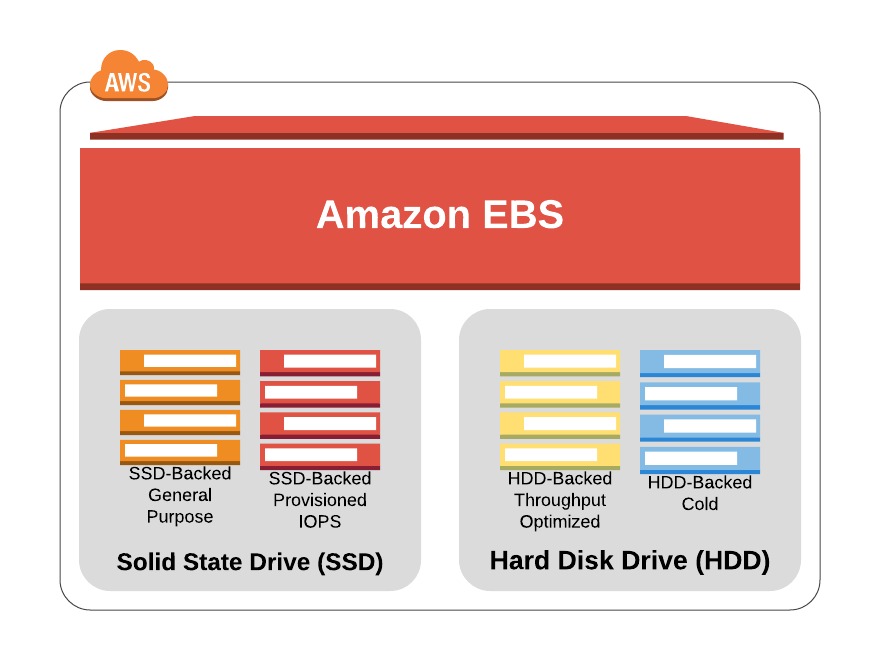
You can attach as many Elastic Block Store (EBS) volumes to your instance as you like and use them just as you would as you would hard drives, flash drives, or USB drives with your physical server. And as with physical drives, the type of EBS volume you choose will have an impact on both performance and cost. The AWS SLA guarantees the reliability of the data you store on its EBS volumes (promising at least 99.999 percent availability), so you don’t have to worry about failure. When an EBS drive does fail, its data has already been duplicated and will probably be brought back online before anyone notices a problem. So, practically, the only thing that should concern you is how quickly and efficiently you can access your data. There are currently four EBS volume types, two using solid-state drive (SSD) technologies and two using the older spinning hard drives (HDDs). The performance of each volume type is measured in maximum IOPS/volume (where IOPS means input/output operations per second).

EBS-Provisioned IOPS SSD

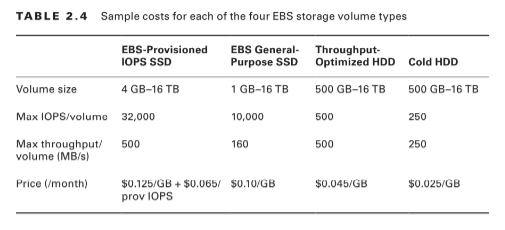
If your applications will require intense rates of I/O operations, then you should consider provisioned IOPS, which provides a maximum IOPS/volume of 32,000 and a maximum throughput/volume of 500 MB/s. Provisioned IOPS—which in some contexts is referred to as EBS Optimized—can cost $0.125/GB/month in addition to $0.065/provisioned IOPS.

EBS General-Purpose SSD

For most regular server workloads that, ideally, deliver low-latency performance, general purpose SSDs will work well. You’ll get a maximum of 10,000 IOPS/volume, and it’ll cost you $0.10/GB/month. For reference, a general-purpose SSD used as a typical 8 GB boot drive for a Linux instance would, at current rates, cost you $9.60/year.

Throughput-Optimized HDD

Throughput-optimized HDD volumes can provide reduced costs with acceptable performance where you’re looking for throughput-intensive workloads including log processing and big data operations. These volumes can deliver only 500 IOPS/volume but with a 500 MB/s maximum throughput/volume, and they’ll cost you only $0.045/GB/month.

Cold HDD

When you’re working with larger volumes of data that require only infrequent access, a 250 IOPS/volume type might meet your needs for only $0.025/GB/month. Table 2.4 lets you compare the basic specifications and estimated costs of those types.Tab le 2.4 Sample costs for each of the four EBS storage volume types

EBS Volume Features

All EBS volumes can be copied by creating a snapshot. Existing snapshots can be used to generate other volumes that can be shared and/or attached to other instances or converted to images from which AMIs can be made. You can also generate an AMI image directly from a running instance-attached EBS volume—although, to be sure no data is lost, it’s best to shut down the instance first. EBS volumes can be encrypted to protect their data while at rest or as it’s sent back and forth to the EC2 host instance. EBS can manage the encryption keys automatically behind the scenes or use keys that you provide through the AWS Key Management Service (KMS). Exercise 2.4 will walk you through launching a new instance based on an existing snapshot image.

Instance Store Volumes Unlike

EBS volumes, instance store volumes are ephemeral. This means that when the instances they’re attached to are shut down, their data is permanently lost. So, why would you want to keep your data on an instance store volume more than on EBS?– Instance store volumes are SSDs that are physically attached to the server hosting your instance and are connected via a fast NVMe interface. – The use of instance store volumes is included in the price of the instance itself. – Instance store volumes work especially well for deployment models where instances are launched to fill short-term roles (as part of autoscaling groups, for instance), import data from external sources, and are, effectively, disposable. Whether one or more instance store volumes are available for your instance will depend on the instance type you choose. This is an important consideration to take into account when planning your deployment. Even with all the benefits of EBS and instance storage, it’s worth noting that there will be cases where you’re much better off keeping large data sets outside of EC2 altogether. For many use cases, Amazon’s S3 service can be a dramatically less expensive way to store files or even databases that are nevertheless instantly available for compute operations. You’ll learn more about this in Chapter 3, “Amazon Simple Storage Service and Amazon Glacier Storage.”

Accessing Your EC2 Instance

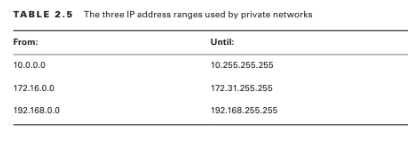
Like all networked devices, EC2 instances are identified by unique IP addresses. All instances are assigned at least one private IPv4 address that, by default, will fall within one of the blocks shown in Table 2.5.

Out of the box, you’ll only be able to connect to your instance from within its subnet, and the instance will have no direct contact to the Internet. If your instance configuration calls for multiple network interfaces (to connect to otherwise unreachable resources), you can create and then attach one or more virtual Elastic Network Interfaces to your instance. Each of these interfaces must be connected to an existing subnet and security group. You can optionally assign a static IP address within the subnet range. Of course, an instance can also be assigned a public IP through which full Internet access is possible. As you learned earlier as part of the instance lifecycle discussion, the default public IP assigned to your instance is ephemeral and probably won’t survive a reboot.

Read More : https://www.info-savvy.com/aws-elastic-block-storage-volumes-and-its-features/

————————————————————————————————————

This Blog Article is posted by

Infosavvy, 2nd Floor, Sai Niketan, Chandavalkar Road Opp. Gora Gandhi Hotel, Above Jumbo King, beside Speakwell Institute, Borivali West, Mumbai, Maharashtra 400092

Contact us – www.info-savvy.com
AWS

Introduction of Amazon Elastic Compute Cloud (EC2)

You will learn in this blog EC2 It’s an Amazon Elastic Compute Cloud and will explore the tools and practices wont to fully leverage the ability of the EC2 ecosystem.

Introduction

The ultimate focus of a standard data centre/server room is its precious servers. But, to create those servers useful, you’ll got to add racks, power supplies, cabling, switches, firewalls, and cooling. AWS’s Elastic Compute Cloud (EC2) is intended to copy the info centre/server room experience as closely as possible. At the middle of it all is that the EC2 virtual server, referred to as an instance. But, just like the local server room I just described, EC2 provides a variety of tools meant to support and enhance your instance’s operations.

This chapter will explore the tools and practices wont to fully leverage the ability of the EC2 ecosystem, including the following:
– Provisioning an EC2 instance with the proper hardware resources for your project
– Configuring the proper base OS for your application needs
– Building a secure and effective network environment for your instance
– Adding scripts to run because the instance boots to support (or start) your application
– Choosing the simplest EC2 pricing model for your needs
– Understanding the way to manage and leverage the EC2 instance lifecycle
– Choosing the proper storage drive type for your needs
– Securing your EC2 resources using key pairs, security groups, and Identity and Access Management (IAM) roles
– Accessing your instance as an administrator or end-user client

EC2 Instances

An EC2 instance may only be a virtualized and abstracted subset of a physical server, but it behaves a bit like the important thing. It’ll have access to storage, memory, and a network interface, and its primary drive will accompany a fresh and clean OS running. It’s up to you to make a decision what quite hardware resources you would like your instance to possess , what OS and software stack you’d love it to run, and, ultimately, what quantity you’ll buy it. Let’s see how all that works.

Provisioning Your Instance

You configure your instance’s OS and software stack, hardware specs (the CPU power, memory, primary storage, and network performance), and environment before launching it. The OS is defined by the Amazon Machine Image (AMI) you select , and therefore the hardware follows the instance type.

EC2 Amazon Machine Images

An AMI is basically just a template document that contains information telling EC2 what OS and application software to incorporate on the basis data volume of the instance it’s close to launch. There are four sorts of AMIs.

Amazon Quick Start AMIs

Amazon Quick Start images appear at the highest of the list within the console once you start the method of launching a replacement instance. the fast Start AMIs are popular choices and include various releases of Linux or Windows Server OSs and a few specialty images for performing common operations (like deep learning and database). These AMIs are up-to-date and officially supported.

AWS Marketplace AMIs

AMIs from the AWS Marketplace are official, production-ready images provided and supported by industry vendors like SAP and Cisco.

Community AMIs

There are quite 100,000 images available as Community AMIs. Many of those images are AMIs created and maintained by independent vendors and are usually built to satisfy a selected need. this is often an honest catalog to look if you’re planning an application built on a custom combination of software resources.

Private AMIs

You can also store images created from your own instance deployments as private AMIs. Why would you would like to try to that? you would possibly , as an example , want the power to proportion the amount of instances you’ve got running to satisfy growing demand. Having a reliable instance image as an AMI makes incorporating auto scaling easy. you’ll also share images as AMIs or import VMs from your local infrastructure (by way of AWS S3) using the AWS VM Import/Export tool. a specific AMI are going to be available in just one region—although there’ll often be images with identical functionality altogether regions. Keep this in mind as you propose your deployments: invoking the ID of an AMI in one region while performing from within a special region will fail.

Instance Types

AWS allocates hardware resources to your instances consistent with the instance type—or hardware profile—you select. the actual workload you’re planning for your instance will determine the sort you select . the thought is to balance cost against your need for compute power, memory, and space for storing . Ideally, you’ll find a kind that gives precisely the amount of every to satisfy both your application and budget. Should your needs change over time, you’ll easily move to a special instance type by stopping your instance, editing its instance type, and starting it copy again.
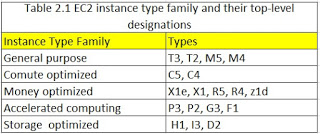
There are currently quite 75 instance types organized into five instance families, although AWS frequently updates their selection. you’ll view the foremost recent collection at https://aws.amazon.com/ec2/instance-types/.

Read More : https://www.info-savvy.com/introduction-of-amazon-elastic-compute-cloud-ec2/

————————————————————————————————————

This Blog Article is posted by

Infosavvy, 2nd Floor, Sai Niketan, Chandavalkar Road Opp. Gora Gandhi Hotel, Above Jumbo King, beside Speakwell Institute, Borivali West, Mumbai, Maharashtra 400092

Contact us – www.info-savvy.com

https://g.co/kgs/ttqPpZ

Uncategorized

Planning a Threat Intelligence Program

Implementation of a threat intelligence program is a dynamic process that gives organizations with valuable insights based on the investigation of discourse threats and risks that area unit used to enhance the safety posture. Before implementing the threat intelligence program, organizations have to be compelled to prepare associate acceptable set up. Firstly, the organization has to decide the aim of extracting threat intelligence and who are going to be concerned in planning the threat intelligence program.

This section provides a summary of various topics associated with coming up with and development of a threat intelligence program. It discusses concerning getting ready folks, processes, and technology; developing a set plan; planning the threat intelligence program; coming up with the budget; developing a communication attempt to update achieve stakeholders; and concerns for aggregating threat intelligence and factors for choosing threat intelligence platform. It conjointly discusses concerning totally different goals for intense threat intelligence and track metrics to stay stakeholder’ ship to.
Prepare folks, Processes, and Technology
Threat intelligence is useful for a company to develop a security infrastructure, however this data alone cannot give enough edges if it’s while not the support of a right team of individuals, integrated processes, and technology. Preparation is crucial for a corporation to confirm that it’s able to consume, analyze, and take actions upon threat intelligence.
• People
An organization could appoint an indoor threat intelligence team or incorporate sure duties into existing roles.
The cyber threat intelligence team should fulfill the subsequent responsibilities:
• Cyber forensics
• Malware reverse-engineering
• Managing threat intelligence operations
Threat assessment
• Collection, analysis, and dissemination of threat data
• Collaborating with all data security groups among a corporation
• Processes
Information security processes will derive advantages from threat intelligence. The organization must establish an explicit set of processes that needs input from threat intelligence and more perceive however the intelligence should be given for that purpose. With the threat info, the organization will enhance the safety posture of the network by developing effective security policies and methods.
For example, an data assurance team will develop a defense-in-depth strategy be victimization the intelligence on famous attacks, threat actors, and ways wont to launch an attack. Similarly, an event notice ion and response team will use indicators derived from threat intelligence to detect and defend the organization network against varied attacks.
In-depth analysis is needed for understanding the requirements the wants and requirements of the audience for threat intelligence. Most of the organizations use managed Security Service supplier 1%+155P) that helps in providing recommendations on integration threat intelligence into their surroundings.
• Technology
Proper utilization of threat intelligence needs effective use of producers and shoppers of threat intelligence.
Discussed below area unit the producers and shoppers of threat intelligence:
• Raw information Producers
Raw data producer’s area unit security systems or devices like proxy servers or firewalls. These devices monitor the work on activities and manufacture log files or capture packets.
In. Threat information shoppers
Threat information shopper’s area unit mental health systems or devices that take input from threat information so as to notice and forestall the network against malicious activities. The shoppers of threat information embrace proxy servers, firewalls, and intrusion interference systems. Relying upon the threat information, firewalls will embrace sure rules to notice and block incoming malicious traffic from unknown scientific discipline addresses. Similarly, proxy servers and intrusion interference systems use varied rules to observe the network against suspicious traffic and block it if necessary.
Threat Intelligence shoppers
Threat intelligence client may be a remote management platform to manage threat intelligence: for instance, SI EM solutions.
Threat Intelligence Producers
Threat intelligence producer may be a threat intelligence cooperative platform or threat intelligence feed.
Threat intelligence are often wont to improve the safety infrastructure of the structure network and improve the aptitude of security devices to defend against attacks. It are often achieved IN translating the threat intelligence to threat information and so feeding it into the safety devices. The threat information includes all malicious activities to appear for within the network. To effectively defend the organization’s assets against attacks, security devices should be deployed strategically throughout the network. Though the safety devices deployed at the perimeter of the network will stop some attacks,
The organization ought to assure that the attackers will still defeat them to achieve access to the network. The presence of multiple layers of defenses throughout the network will effectively cut back AN attacker’s ability to stay undiscovered for an extended amount of your time.
With the advancement in threat intelligence method, the rise within the size of the threat information and intelligence will create manual handling of knowledge a troublesome method. Therefore, organizations should ask for to modify the method of overwhelming and distributing threat intelligence to the safety devices.
Given below area unit some area unit as that are relevant to automation:
• Using normal formats
• Using a threat intelligence platform .0 Subscribing to a threat intelligence feed

Uncategorized

Understanding the Volatile evidence assortment

Most of the systems store information associated with this session in temporary type across registries, cache, and RAM. This information is well lost once the user switches the system off, leading to loss of the session data. Therefore, the primary responders got to extract it as a priority.This section explains why volatile information is vital, order of volatility, volatile information assortment methodology, and collection volatile data alongside tools.

Why Volatile information Important?

Volatile data refers to the data hold on within the registries, cache, and RAM of digital devices. This data is lost or erased whenever the system is turned off or rebooted. The volatile data is dynamic in nature and keeps on dynamic with time; therefore, the incident responders/investigators ought to be able to collect the information in real time.
Volatile information exists within the physical memory or RAM and consists of method data, process-to-port mapping, method memory, network connections, writing board contents, state of the system, and so on. The incident responders/investigators should collect this information throughout the live information acquisition method.
The first step to require when the tending security incident report is to amass volatile information. Volatile information is vital for investigation the crime scene as a result of it contains helpful data.

Volatile data includes:
Running processes                                  
Passwords in clear text                          
Instant messages (IMs)                          
Executed console commands                
Internet Protocol (IP) addresses          
Trojan horse(s)                                      
Unencrypted data

Additional useful volatile data includes:
Logging information
Open ports and listening
applications
Registry information
System information
Attached devices
This information assists in determinative a logical timeline of the safety incident and also the doable users accountable.

Order of Volatility

Incident responders/investigators should keep in mind that the whole information don’t have an equivalent level of volatility and collect the foremost volatile information initial, throughout live acquisitions.

The order of volatility for a typical computer system is as follows:

Registers and cache

The information within the registers or the processor cache on the pc exists around for a matter of nanoseconds. They are there forever ever-changing and are the foremost volatile information.

Routing table, method table, kernel statistics, and memory

A routing table, ARP cache, kernel statistics data is within the normal memory of the pc. These are a small amount less volatile than the data within the registers, with the life associate usually nanoseconds.

Temporary file systems

Temporary file systems term to be gift for a extended time on the pc compared to routing tables, ARP cache, and so on. These systems square measure eventually over written or modified, generally in seconds or minutes later.

Disk or different storage media

Anything hold on a disk stays for a short time. However, sometimes, things might fail and erase or write over that information. Therefore, disk information also are volatile with a time period of some minutes.

Remote work and observance information associated with the target system

The data that goes through a firewall generates logs during a router or during a switch. The Totem may store these logs away. the matter is that these logs will over Write themselves, generally every day later, associate hour later, or per week later. However, usually they’re less volatile than a tough drive.

Physical configuration and topology

Physical configuration and topology are less volatile and have additional lifetime than another logs.

Archival media

A DVD-ROM, a fixed storage or a tape will have the smallest amount volatile information as a result of the digital data isn’t planning to amendment in such information sources mechanically any time unless broken beneath a physical force.

Volatile information assortment Methodology

The volatile information assortment plays a serious role within the crime scene investigation. to confirm no loss occur throughout the gathering of vital proof, the investigators or incident responders ought to follow the right methodology and supply a documented approach for playing activities during a accountable manner.

Discussed below is that the bit-by-bit procedure for the volatile information assortment methodology:

Step 1: Incident Response Preparation

Eliminating or anticipating every kind of security incident or threat isn’t doable. However, to gather every kind of volatile information, responders should be able to react to the safety incident with success. The incident responders attempting to assemble volatile information should have expertise in collection volatile information, correct permissions, and authorization from incident manager or security administrator or an individual in authority should be taken before assembling information.

The following things ought to be in situ before an event occurs:
At least answerer toolkit response disk
An incident response team IRT or selected 1st answerer
Forensic-related policies that leave rhetorical information assortment

Step 2: Incident Documentation

Ensure to store the logs and profiles in organized and decipherable format. as an example, use naming conventions for rhetorical tool output, record time stamps of log activities and embrace the identity of the rhetorical investigator or incident answerer. Document all the knowledge concerning the safety incident wants and maintain a book to record all actions throughout the forensic assortment. Mistreatment the primary answerer toolkit book helps to decide on the most effective tools for the investigation.

Step 3: Policy Verification

Ensure that the actions planned don’t violate the present network and laptop usage policies and any rights of the registered owner or user likewise.

Points to think about for policy verification:
Read and examine all the policies signed by the user of the suspicious laptop
Determine the rhetorical capabilities and limitations of the incident answerer by decisive the legal rights together with a review of federal statutes of the user

Step 4: Volatile information assortment Strategy

Security incidents don’t seem to be similar. the primary answerer toolkit book and also the queries from the graphic to form the volatile information assortment strategy that suits true and leaves a negligible quantity of footprint on the suspicious system ought to be used.
Devise a method supported concerns like the sort of volatile information, the supply of the info, kind of media used, and sort of association. make certain to possess enough area to repeat the whole info.

Step 5: Volatile information assortment Setup

Volatile information assortment setup includes following steps:
Establish a trustworthy command shell
Do not open or use a command shell or terminal from the suspicious system. This minimizes the footprint on the suspicious system and restricts the triggering of any reasonably malware put in crime the system.

Establish the transmission and storage methodology
Identify and record the information the info the information transmission from the live suspicious laptop to the remote data assortment system, as there’ll not be enough area on response disk to gather rhetorical tool output. For example: internet cat and crypt cat that transmit information remotely via a network.

Ensure the integrity of forensic tool output
Compute AN MD5 hash, of the forensic tool output to confirm integrity and acceptableness.

Step 6: Volatile information assortment method

Record the time, date, and command history of the system
To establish AN audit path generate dates and times whereas capital punishment every rhetorical tool or command
Start a command history to document all the forensic assortment activities. Collect all doable volatile info from the system and network
Do not shut clown or restart a system beneath investigation till all relevant volatile information has been recorded
Maintain a log of all actions conducted on a running machine
Photograph the screen of the running system to document its state
Identify the OS running on the suspect machine
Note system date, time and command history, if shown on screen, and record with the current actual time
Check the system for the utilization of whole disk or tile encoding
Do not use the executive utilities on the compromised system throughout an investigation, and significantly use caution once running diagnostic utilities
As every forensic tool or command is dead, generate the date and time to ascertain an audit path
Dump the RAM from the system to a forensically sterile removable storage device
Collect different volatile CAS information and save to a removable memory device
Determine proof seizure methodology of hardware and any extra artifacts on the disc drive which will be determined to be of evidentiary value}
Complete a full report documenting all steps and actions taken.

Uncategorized

Performing of evidence Analysis

Evidence is not static and not focused at one purpose on the network. the variability of hardware and code found on the network makes the evidence-gathering method tougher. when gathering proof, proof analysis helps to reconstruct the crime to provide a clearer image of the crime and determine the missing links within the image.

Evidence Analysis: Preparations
Preparation takes several steps before beginning an actual proof analysis. the primary communicator has to prepare and check many conditions like the provision of tools, reportage demand, and legal clearances so as to conduct a eminent invest igat particle . it’s necessary to arrange and consult w it h the involved persons, that is needed before, during, and when the investigation. proof analysis helps during analyzing the proof to search out the attackers and technique of attacks in a lawfully sound manner.

As a district of an proof analysis, the primary responders can perform following preparations:
• Understand the investigation needs and situations
• Check w it h the lawyer/organization for any specific analysis needs
• Have a replica of organization’s rhetorical investigation policy
• Transport proof to a secure location or rhetorical investigation science lab
• Check the la b facilities before beginning the analysis
• Prepare the proof analysis toolkit containing imaging, recovery, and analysis tools

Forensic Analysis Tools
Forensics analysis tools facilitate 1st responders in collect image, managing, transferring, and storing necessary info needed throughout forensics investigation. using these tools, a primary respondent will act quickly throughout investigation a security incident. a complicated investigation toolkit will cut back the incident impact by stopping the incident from spreading through the systems. this can minimize the organization’s injury and a id the investigation method additionally.

Forensic mortal
Forensic mortal recovers and analyzes hidden and system files, deleted files, file and disk slack and unallocated clusters. Rhetorical mortal could be a tool for the preservation, analysis, and presentation of electronic proof. the first users of this tool area unit investigation agencies that facilitate in acting analysis of electronic proof.

• Event Log mortal
Event Log mortal could be a software system answer for viewing, monitoring, and analyzing events recorded in security, system, application, and different logs of Microsoft Windows operational systems. It helps to quickly browse, find, and report on issues, security warnings, and every one different events that area unit generated inside Windows.

Features:

  1. Use a multiple-document or tabbed-document interface, counting on user preferences.
  2. Favorite computers and their logs ar classified into a tree o duplicate event logs manually and mechanically.
  3. Event descriptions and binary knowledge ar within the log window.
  4. Advanced filtering is feasible by any criteria, as well as event description text.
  5. The fast Filter feature permits you to change event log in an exceedingly few mouse clicks.

• OSForensics
It helps discover relevant forensic knowledge faster with high performance file searches and categorization moreover as restores deleted files. It identifies suspicious files and activity with hash matching, drive signature comparisons and appears into e-mails, memory and binary information. It conjointly manages digital investigation, organizes info and creates reports concerning collected rhetorical information.
• Helix3
Helix3 is a simple to use cyber security answer integrated into your network supplying you with visibility across your entire infrastructure revealing malicious activities like web Abuse, information sharing and harassment.
• Autopsy
Autopsy may be a digital forensics platform and graphical interface to The Sleuth Kit and different digital forensics tools. This tool helps incident handlers to look at the classification system, retrieve deleted information, perform timeline analysis, and net artifacts throughout an occurrence response.
• Encase rhetorical
Encase may be a multi-purpose rhetorical platform that features several helpful tools to support many areas of the digital rhetorical method. This tool will collect ton of information from several devices and extract potential proof. It conjointly generates an proof report. in close rhetorical will facilitate incident responders acquire massive amounts of proof, as quick as doable from laptops and desktop computers to mobile devices. in close rhetorical directly acquires the information and integrates the results into the cases.
• Foremost
Foremost may be a console program to recover files supported their headers, footers, and internal information structures. This method is often cited as information carving. Foremost will work on image files, like those generated by add, Safe back, and inclose or directly on a drive. The headers and footers are often specified by a configuration file otherwise you will use instruction switches to specify built- in file sorts. These inherent sorts consider the info structures of a given f ile format providing a additional reliable and quicker recovery.

Uncategorized

Understanding Indicators of Compromise

The Indicators of Compromise play a serious role in building and enhancing the cyber security posture of a company. Monitoring IOCs helps analysts find and answer varied security incidents quickly. Identification of continual concerns of explicit loCs helps the safety groups in enhancing the protection mechanisms and policies to shield and stop varied evolving attacks. This section provides an outline of IOCs and also the in importance, types of IOCs Key IOCs and also the pyramid of pain.

Indicators of Compromise

Cyber threats are endlessly evolving with the newer TTPs custom-made supported the vulnerabilities of the target organization. the safety analysts got to perform continuous observation of loCs to effectively and expeditiously find and answer the evolving cyber threats. Indicators of Compromise area unit the clues/artifact/ items of forensic knowledge that ar found on a network or OS of a company that indicates a possible intrusion or malicious activity in organization’s infrastructure .

However, loCsar itself not intelligence in reality, IoCs act as a odd supply of information of knowledgeof knowledge regarding threats that function data points within the intelligence method. unjust threat intelligence extracted from loCs helps organizations enhance incident-handling methods. Cyber security professionals use varied machine-driven tools to watch loCs to find and stop varied security breaches to the organization. ObservationloCs additionally helps the protection groups enhance

the security controls and policies of the organization to find and block the suspicious traffic to thwart any attacks. to beat the threats related to loCs, some organizations like STIX and TAXl l have developed standardized reports that contain condensed knowledge associated with the attack and shared it with others to leverage the incident response.

AnloC is outlined as associate atomic indicator, computed indicator, or activity indicator. it’s the data concerning suspicious or malicious activities that is collected from varied security institutions during a network infrastructure. Atomic indicators ar those who can not be metameric into smaller components, associated their which means isn’t modified within the context of an intrusion. samples of atomic indicators ar informatics address, email address, etc. Computed indicators ar that obtained from the info extracted from a security incident. Samples of computed indicators ar hash values and regular expressions. Activity indicators check with a grouping of each atomic and computed indicators combined supported some logic.

Why Indicators of Compromise Important?

Indicators of Compromise act as a chunk of forensic information that helps organizations discover malicious activity at an initial section. These activities that are sometimes labelled as red flags indicate associate anack that has the potential of compromising system or will cause a knowledge breach.

loCs will be as easy as information or as difficult as malicious code. Therefore, it’s troublesome to notice them. Threat analysts sometimes correlate varied loCs and mixture them to investigate a possible threat or an event. Using loCs, organizations will find, identify, and answer anacks or threats before they harm the network. Therefore, observance loCs is important to the organization from security compromises.

Following are the explanations why analysing loCs is crucial for the organization:

. Helps security analysts in detection information breaches, malware immersion makes an attempt, or different threat activities

. Assists security analysts in knowing “what happened” regarding the attack and helps the analysts observe the behaviour and characteristics of malware

. Helps improve latency still as upgrade the detection rate of the threats

. Provides security analysts with information feeds that may be fed into the organization’s auto­ response mechanism or machine-controlled security devices. It helps them perform scans automatically to find if those attacks exist in the setting or not. onceloCs follow some pattern or show revenant behaviour, analysts will update tools and security policies supported that specific behaviour of malware .

Helps analysts to find answers to the subsequent questions:

Does the file include malicious content?

Does the organization network compromised?

however did the network get infected?

what’s the history of a selected information processing address?

. Assists analysts in following a uniform approach for documentation of every specific threat which will be simply shared with team members

. Provides a better method for the detection of zero-day attacks that detection rules have to be compelled to be developed for the prevailing security tools

. Provides a decent supply of information and a decent place to begin for concluding investigation method.