Blog Feed

AWS

Introduction to VPC Elastic Network Interfaces

Introduction to VPC Elastic Network Interfaces is an elastic network interface (ENI) allows an instance to communicate with other network resources including AWS services, other instances, on-premises servers, and the Internet. It also makes it possible for you to connect to the operating system running on your instance to manage it. As the name suggests, an ENI performs the same basic function as a network interface on a physical server, although ENIs have more restrictions on how you can configure them. Every instance must have a primary network interface (also known as the primary ENI) , which is connected to only one subnet. This is the reason you have to specify a subnet when launching an instance. You can’t remove the primary ENI from an instance.

Related Products:– AWS Certified Solutions Architect | Associate

Primary and Secondary Private IP Addresses

Each instance must have a primary private IP address from the range specified by the subnet CIDR. The primary private IP address is bound to the primary ENI of the instance. You can’t change or remove this address, but you can assign secondary private IP addresses to the primary ENI. Any secondary addresses must come from the same subnet that the ENI is attached to. It’s possible to attach additional ENIs to an instance. Those ENIs may be in a different subnet, but they must be in the same availability zone as the instance. As always, any addresses associated with the ENI must come from the subnet to which it is attached.

Attaching Elastic Network Interfaces

An ENI can exist independently of an instance. You can create an ENI first and then attach it to an instance later. For example, you can create an ENI in one subnet and then attach it to an instance as the primary ENI when you launch the instance. If you disable the Delete on Termination attribute of the ENI, you can terminate the instance without deleting the ENI. You can then associate the ENI with another instance. You can also take an existing ENI and attach it to an existing instance as a secondary ENI. This lets you redirect traffic from a failed instance to a working instance by detaching the ENI from the failed instance and reattaching it to the working instance. Complete Exercise 4.3 to practice creating an ENI and attaching it to an instance.

Internet Gateways

An Internet gateway gives instances the ability to receive a public IP address, connect to the Internet, and receive requests from the Internet. When you create a VPC, it does not have an Internet gateway associated with it. You must create an Internet gateway and associate it with a VPC manually. You can associate only one Internet gateway with a VPC. But you may create multiple Internet gateways and associate each one with a different VPC. An Internet gateway is somewhat analogous to an Internet router an Internet service provider may install on-premises. But in AWS, an Internet gateway doesn’t behave exactly like a router. In a traditional network, you might configure your core router with a default gateway IP address pointing to the Internet router to give your server’s access to the Internet. An Internet gateway, however, doesn’t have a management IP address or network interface. Instead, AWS identifies an Internet gateway by its resource ID, which begins with igw- followed by an alphanumeric string. To use an Internet gateway, you must create a default route in a route table that points to the Internet gateway as a target.

Route Tables

Configurable virtual routers do not exist as VPC resources. Instead, the VPC infrastructure implements IP routing as a software function and AWS calls this function an implied router (also sometimes called an implicit router). This means there’s no virtual router on which to configure interface IP addresses or dynamic routing protocols. Rather, you only have to manage the route table which the implied router uses. Each route table consists of one or more routes and at least one subnet association. Think of a route table as being connected to multiple subnets in much the same way a traditional router would be. When you create a VPC, AWS automatically creates a default route table called the main route table and associates it with every subnet in that VPC. You can use the main route table or create a custom one that you can manually associate with one or more subnets. If you do not explicitly associate a subnet with a route table you’ve created, AWS will implicitly associate it with the main route table. A subnet cannot exist without a route table association.

Routes

Routes determine how to forward traffic from instances within the subnets associated with the route table. IP routing is destination-based, meaning that routing decisions are based only on the destination IP address, not the source. When you create a route, you must provide the following elements:

  • Destination
  • Target

The destination must be an IP prefix in CIDR notation. The target must be an AWS network resource such as an Internet gateway or an ENI. It cannot be a CIDR. Every route table contains a local route that allows instances in different subnets to communicate with each other. Table 4.2 shows what this route would look like in a VPC with the CIDR 172.31.0.0/16.

The Default Route

The local route is the only mandatory route that exists in every route table. It’s what allows communication between instances in the same VPC. Because there are no routes for any other IP prefixes, any traffic destined for an address outside of the VPC CIDR range will get dropped.To enable Internet access for your instances, you must create a default route pointing to the Internet gateway. After adding a default route, you would end up with this:

The 0.0.0.0/0 prefix encompasses all IP addresses, including those of hosts on the Internet. This is why it’s always listed as the destination in a default route. Any subnet that is associated with a route table containing a default route pointing to an Internet gateway is called a public subnet. Contrast this with a private subnet that does not have a default route. Notice that the 0.0.0.0/0 and 172.31.0.0/16 prefixes overlap. When deciding where to route traffic, the implied router will route based on the closest match. Suppose an instance sends a packet to the Internet address 198.51.100.50. Because 198.51.100.50 does not match the 172.31.0.0/16 prefix but does match the 0.0.0.0/0 prefix, the implied router will use the default route and send the packet to the Internet gateway. AWS documentation speaks of one implied router per VPC. It’s important to understand that the implied router doesn’t actually exist as a discrete resource. It’s an abstraction of an IP routing function. Nevertheless, you may find it helpful to think of each route table as a separate implied router. Follow the steps in Exercise 4.4 to create an Internet gateway and a default route.

Security Groups

A security group functions as a firewall that controls traffic to and from an instance by permitting traffic to ingress or egress that instance’s ENI. Every ENI must have at least one security group associated with it. One ENI can have multiple security groups attached, and the same security group can be attached to multiple ENIs. In practice, because most instances have only one ENI, people often think of a security group as being attached to an instance. When an instance has multiple ENIs, take care to note whether those ENIs use different security groups. When you create a security group, you must specify a group name, description, and VPC for the group to reside in. Once you create the group, you specify inbound and outbound rules to allow traffic through the security group.

Also Read:– Introduction to Amazon Glacier Service

Inbound Rules

Inbound rules specify what traffic is allowed into the attached ENI. An inbound rule consists of three required elements:

  • Source
  • Protocol
  • Port range

When you create a security group, it doesn’t contain any inbound rules. Security groups use a default-deny approach, also called whitelisting, which denies all traffic that is not explicitly allowed by a rule. When you create a new security group and attach it to an instance, all inbound traffic to that instance will be blocked. You must create inbound rules to allow traffic to your instance. For this reason, the order of rules in a security group doesn’t matter. Suppose you have an instance running an HTTPS-based web application. You want to allow anyone on the Internet to connect to this instance, so you’d need an inbound rule to allow all TCP traffic coming in on port 443 (the default port and protocol for HTTPS). To manage this instance using SSH, you’d need another inbound rule for TCP port 22. However, you don’t want to allow SSH access from just anyone. You need to allow SSH access only from the IP address 198.51.100.10. To achieve this, you would use a security group containing the inbound rules listed in Table 4.3.

The prefix 0.0.0.0/0 covers all valid IP addresses, so using the preceding rule would allow HTTPS access not only from the Internet but from all instances in the VPC as well.

Read More : https://www.info-savvy.com/introduction-to-vpc-elastic-network-interfaces/

————————————————————————————————————

This Blog Article is posted by

Infosavvy, 2nd Floor, Sai Niketan, Chandavalkar Road Opp. Gora Gandhi Hotel, Above Jumbo King, beside Speakwell Institute, Borivali West, Mumbai, Maharashtra 400092

Contact us – www.info-savvy.com

https://g.co/kgs/ttqPpZ

AWS

Services Related Elastic Compute Cloud (EC2)

Services Related Elastic Compute Cloud (EC2) in this article you will learn different types of EC2 Services like AWS Systems Manager, Placement Groups, AWS Elastic Beanstalk and Amazon Elastic Container Service and AWS Far gate etc.

EC2-Related Services

This section will briefly introduce you to a few more EC2 features. Some of these features won’t necessarily play a large role in the solutions architect exam but could definitely come in handy for you in your work at some point. Others are only touched on here but will be examined in greater detail later in the book.

Related Products:– AWS Certified Solutions Architect | Associate

AWS Systems Manager

Systems Manager Services (available through the AWS console) is a collection of tools for monitoring and managing the resources you have running in the AWS cloud and in your own on-premises infrastructure. Through the Systems Manager portal, you can organize your AWS resources into resource groups, mine various visualization tools for insights into the health and behaviour of your operations, directly execute commands or launch tasks remotely without having to log on, automate patching and other lifecycle events, and manage service parameters and access secrets.

Placement GroupsPlacement groups are useful for multiple EC2 instances that require especially low-latency network interconnectivity. There are two placement group strategies.

  • Cluster groups launch each associated instance within a single availability zone within close physical proximity to each other.
  • Spread groups separate instances physically across hardware to reduce the risk of failure-related data or service loss.

AWS Elastic Beanstalk

Elastic Beanstalk lets you upload your application code and define a few parameters, and AWS will configure, launch, and maintain all the infrastructure necessary to keep it running. That might include EC2 load-balanced and auto scaled instances, RDS database instances, and all the network plumbing you would otherwise have had to build yourself. Compatible languages and platforms include .NET, Java, Node.js, Python, and Docker. Elastic Beanstalk adds no charges beyond the cost of the running infrastructure itself.

Also Read:– AWS Elastic Block Storage Volumes and It’s Features

Amazon Elastic Container Service and AWS Far gate

Running Docker container-based applications at scale is the kind of thing that’s a natural fit for a cloud platform like AWS. Once upon a time, if you wanted to get that done, you’d have to fire up one or more robust EC2 instances and then manually provision them as your Docker hosts. With Amazon Elastic Container Service (ECS), however, AWS lets you launch a prebuilt Docker host instance and define the way you want your Docker containers to behave (called a task), and ECS will make it all happen. The containers will exist within an infrastructure that’s automated and fully integrated with your AWS resources. The more recently released Fargate tool further abstracts the ECS configuration process, removing the need for you to run and configure instances for your containers. With Fargate, all you do is package your application and set your environment requirements.

AWS Lambda

“Serverless” applications are powered by programming code that’s run on servers—just not servers under the control of the application owners. Instead, code can be configured to run when AWS’s Lambda servers are triggered by preset events. Lambda allows you to instantly perform almost any operation on demand at almost any time but without having to provision and pay for always-on servers.

VM Import/Export

VM Import/Export allows you to easily move virtual machine images back and forth between your on-premises VMware environment and your AWS account (via an S3 bucket). This can make it much simpler to manage hybrid environments and to efficiently migrate workloads up to the AWS cloud.

Read More : https://www.info-savvy.com/services-related-elastic-compute-cloud-ec2/
———————————————————————–
This Blog Article is posted by

Infosavvy, 2nd Floor, Sai Niketan, Chandavalkar Road Opp. Gora Gandhi Hotel, Above Jumbo King, beside Speakwell Institute, Borivali West, Mumbai, Maharashtra 400092

Contact us – www.info-savvy.com

https://g.co/kgs/ttqPpZ

AWS

Introduction to Amazon Glacier Service

Introduction to Amazon Glacier Service this is the blog topic in that you will learn S3 and Glacier Select, Amazon Glacier, Storage Pricing & Other Storage-Related Services like Amazon Elastic File System, AWS Storage Gateway, AWS Snowball etc

S3 and Glacier Select

AWS provides a different way to access data stored on either S3 or Glacier: Select. The feature lets you apply SQL-like queries to stored objects so that only relevant data from within objects is retrieved, permitting significantly more efficient and cost-effective operations. One possible use case would involve large CSV files containing sales and inventory data from multiple retail sites. Your company’s marketing team might need to periodically analyse only sales data and only from certain stores. Using S3 Select, they’ll be able to retrieve exactly the data they need—just a fraction of the full data set—while bypassing the bandwidth and cost overhead associated with downloading the whole thing.

Related Products:– AWS Certified Solutions Architect | Associate

Amazon Glacier

At first glance, Glacier looks a bit like just another S3 storage class. After all, like most S3 classes, Glacier guarantees 99.999999999 percent durability and, as you’ve seen, can be incorporated into S3 lifecycle configurations.Nevertheless, there are important differences. Glacier, for example, supports archives as large as 40 TB rather than the 5 TB limit in S3. Its archives are encrypted by default, while encryption on S3 is an option you need to select; and unlike S3’s “human-readable” key names, Glacier archives are given machine-generated IDs. But the biggest difference is the time it takes to retrieve your data. Getting the objects in an existing Glacier archive can take a number of hours, compared to nearly instant access from S3. That last feature really describes the purpose of Glacier: to provide inexpensive long-term storage for data that will be needed only in unusual and infrequent circumstances.

Storage Pricing

To give you a sense of what S3 and Glacier might cost you, here’s a typical usage scenario. Imagine you make weekly backups of your company sales data that generate 5 GB archives. You decide to maintain each archive in the S3 Standard Storage and Requests class for its first 30 days and then convert it to S3 One Zone (S3 One Zone-IA), where it will remain for 90 more days. At the end of those 120 days, you will move your archives once again, this time to Glacier, where it will be kept for another 730 days (two years) and then deleted.Once your archive rotation is in full swing, you’ll have a steady total of (approximately) 20 GB in S3 Standard, 65 GB in One Zone-IA, and 520 GB in Glacier. Table 3.3 shows what that storage will cost in the US East region at rates current at the time of writing.

Of course, storage is only one part of the mix. You’ll also be charged for operations including data retrievals; PUT, COPY, POST, or LIST requests; and lifecycle transition requests. Full, up-to-date details are available at https://aws.amazon.com/s3/pricing/.

Other Storage-Related Services

It’s worth being aware of some other storage-related AWS services that, while perhaps not as common as the others you’ve seen, can make a big difference for the right deployment.

 Amazon Elastic File System

 The Elastic File System (EFS) provides automatically scalable and shareable file storage. EFS-based files are designed to be accessed from within a virtual private cloud (VPC) via Network File System (NFS) mounts on EC2 instances or from your on-premises servers through AWS Direct Connect connections. The object is to make it easy to enable secure, low-latency, and durable file sharing among multiple instances.

Also Read:– Amazon simple storage service Lifecycle

AWS Storage Gateway

Integrating the backup and archiving needs of your local operations with cloud storage services can be complicated. AWS Storage Gateway provides software gateway appliances (based on VMware ESXi, Microsoft Hyper-V, or EC2 images) with multiple virtual connectivity interfaces. Local devices can connect to the appliance as though it’s a physical backup device like a tape drive, while the data itself is saved to AWS platforms like S3 and EBS.

Read More : https://www.info-savvy.com/overview-of-amazon-glacier-service/

————————————————————————————————————

This Blog Article is posted byInfosavvy, 2nd Floor, Sai Niketan, Chandavalkar Road Opp. Gora Gandhi Hotel, Above Jumbo King, beside Speakwell Institute, Borivali West, Mumbai, Maharashtra 400092

Contact us – www.info-savvy.com

https://g.co/kgs/ttqPpZ

ISO 27001

ISO 27001 Clause 9.2 Internal audit

Activity

ISO 27001 Clause 9.2 Internal audit, The organization conducts internal audits to supply information on conformity of the ISMS to the wants.

Implementation Guideline

Evaluating an ISMS at planned intervals by means of internal audits provides assurance of the status of the ISMS to top management. Auditing is characterized by variety of principles: integrity; fair presentation; due professional care; confidentiality; independence; and evidence-based approach (see ISO 19011). Internal audits provide information on whether the ISMS conform to the organization’s own requirements for its ISMS also on the wants in ISO/IEC 27001.

Related Products:– ISO 27001 Lead Auditor Training & Certification

The organization’s own requirements include:

  1. Requirements stated within the information security policy and procedures;
  2. Requirements produced by the framework for setting Information security objectives, including outcomes of the danger treatment process;
  3. Legal and contractual requirements;
  4. Requirements on the documented information.

Auditors also evaluate whether the ISMS is effectively implemented and maintained. An audit program describes the general framework for a group of audits, planned for specific time frames and directed towards specific purposes. This is often different from an audit plan, which describes the activities and arrangements for a selected audit. Audit criteria are a group of policies, procedures or requirements used as a reference against which audit evidence is compared, i.e. the audit criteria describe what the auditor expects to be in situation. An internal audit can identify nonconformities, risks and opportunities. Nonconformities are managed consistent with requirements. Risks and opportunities are managed consistent with requirements. The organization is required to retain documented information about audit program and audit results.

Managing an audit program

An audit program defines the structure and responsibilities for planning, conducting, reporting and following abreast of individual audit activities. intrinsically it should make sure that audits conducted are appropriate, have the proper scope, minimize the impact on the operations of the organization and maintain the required quality of audits. An audit program should also make sure the competence of audit teams, appropriate maintenance of audit records, and therefore the monitoring and review of the operations, risks and effectiveness of audits. Further, an audit program should make sure that the ISMS (i.e. all relevant processes, functions and controls) is audited within a specified time frame. Finally, an audit program should include documented information about types, duration, locations, and schedule of the audits.The extent and frequency of internal audits should be supported the dimensions and nature of the organization also as on the character , functionality, complexity and therefore the level of maturity of the ISMS (risk-based auditing).The effectiveness of the implemented controls should be examined within the scope of internal audits.An audit program should be designed to make sure coverage of all necessary controls and will include evaluation of the effectiveness of selected controls over time. Key controls (according to the audit program) should be included in every audit whereas controls implemented to manage lower risks could also be audited less frequently. The audit program should also consider that processes and controls should are operational for a few time to enable evaluation of suitable evidence.Internal audits concerning an ISMS are often performed effectively as a neighborhood of, or together with, other internal audits of the organization. The audit program can include audits associated with one or more management system standards, conducted either separately or together. An audit program should include documented information about: audit criteria, audit methods, selection of audit teams, processes for handling confidentiality, information security, health and safety provisions for auditors, and other similar matters.

Competence and evaluation of auditors

Regarding competence and evaluation of auditors, the organization should:

  1. Identify competence requirements for its auditors;
  2. Select internal or external auditors with the acceptable competence;
  3. Have a process in place for monitoring the performance of auditors and audit teams; and
  4. Include personnel on internal audit teams that have appropriate sector specific and knowledge security knowledge.

Auditors should be selected considering that they should to be competent, independent, and adequately trained. Selecting internal auditors are often difficult for smaller companies. If the required resources and competence aren’t available internally, external auditors should be appointed. When organizations use external auditors, they ought to make sure that they have acquired enough knowledge about the context of the organization. This information should be supplied by internal staff.

Also Read:– ISO 27001 Clause 9.1 Performance evaluation Monitoring, measurement, analysis & evaluation

Organizations should consider that internal employees acting as internal auditors are often ready to perform detailed audits considering the organization’s context, but might not have enough knowledge about performing audits. Organizations should then recognize characteristics and potential shortcomings of internal versus external auditors and establish suitable audit teams with the required knowledge and competence.

Performing the audit

When performing the audit, the audit team leader should prepare an audit plan considering results of previous audits and therefore the got to follow abreast of previously reported nonconformists and unacceptable risks. The audit plan should be retained as documented information and will include criteria, scope and methods of the audit.

The audit team should review:

  1. Adequacy and effectiveness of processes and determined controls;
  2. Fulfillment of data security objectives;
  3. Compliance with requirements defined in ISO/IEC 27001:2013, Clauses 4 to 10;
  4. Compliance with the organization’s own information security requirements;
  5. Consistency of the Statement of Applicability against the result of the knowledge security risk treatment process;
  6. Consistency of the particular information security risk treatment plan with the identified assessed risks and therefore the risk acceptance criteria;
  7. Relevance (considering organization’s size and complexity) of management review inputs and outputs;
  8. Impacts of management review outputs (including improvement needs) on the organization.

The extent and reliability of obtainable monitoring over the effectiveness of controls as produced by the ISMS (see 9.1) may allow the auditors to scale back their own evaluation efforts, provided they need confirmed the effectiveness of the measurement methods.If the result of the audit includes nonconformities, the audit should prepare an action plan for every nonconformity to be agreed with the audit team leader.

Read More : https://www.info-savvy.com/iso-27001-clause-9-2-internal-audit/

————————————————————————————————————

This Blog Article is posted byInfosavvy, 2nd Floor, Sai Niketan, Chandavalkar Road Opp. Gora Gandhi Hotel, Above Jumbo King, beside Speakwell Institute, Borivali West, Mumbai, Maharashtra 400092
Contact us – www.info-savvy.com
https://g.co/kgs/ttqPpZ

ISO 27001

ISO 27001 Clause 9.1 Performance evaluation Monitoring, measurement, analysis & evaluation

Required activity

ISO 27001 Clause 9.1 Performance evaluation Monitoring, measurement, analysis & evaluation, The organization evaluates the knowledge security performance and therefore the effectiveness of the ISMS.

Implementation Guideline

The objective of monitoring and measurement is to assist the organization to gauge whether the intended outcome of data security activities including risk assessment and treatment is achieved as planned. Monitoring determines the status of a system, a process or an activity, whilst measurement may be a process to work out a worth . Thus, monitoring is often achieved through a succession of comparable measurements over a while period.

Related Products:– ISO 27001 Lead Auditor Training and Certification

For monitoring and measurement, the organization establishes:

  1. What to watch and measure;
  2. Who monitors and measures
  3. Methods to be used so on produce valid results (i.e. comparable and reproducible).

For analysis and evaluation, the organization establishes:

  1. Who analyses and evaluates the results from monitoring and measurement, and when
  2. Methods to be used so on produce valid results.

There are two aspects of evaluation:

  1. Evaluating the knowledge security performance, for determining whether the organization is doing needless to say, which incorporates determining how well the processes within the ISMS meet their specifications; 
  2. Evaluating the effectiveness of the ISMS, for determining whether or not the organization is doing the proper things, which incorporates determining the extent to which information security objectives are achieved.

Note that as “as applicable” (ISO/IEC 27001:2013) means if methods for monitoring, measurement, analysis and evaluation are often determined, they have to be determined.A good practice is to define the ‘information need’ when planning the monitoring, measurement, analysis and evaluation. An information need is typically expressed as a high-level information security question or statement that helps the organization evaluate information security performance and ISMS effectiveness. In other words, monitoring and measurement should be undertaken to realize an outlined information need.Care should be taken when determining the attributes to be measured. it’s impracticable, costly and counterproductive to live too many, or the incorrect attributes. Besides the prices of measuring, analyzing and evaluating numerous attributes, there’s an opportunity that key issues might be obscured or missed altogether.

There are two generic sorts of measurements:

  1. Performance measurements, which express the planned leads to terms of the characteristics of the planned activity, like head counts, milestone accomplishment, or the degree to which information security controls are implemented; 
  2. Effectiveness measurements, which express the effect that realization of the planned activities has on the organization’s information security objectives.

Also Read:– ISO 27001 Clause 9.2 Internal audit

It is often appropriate to spot and assign distinctive roles to those participating within the monitoring, measurement, analysis and evaluation. Those roles are often measurement client, measurement planner, measurement reviewer, information owner, information collector, information analyst and knowledge communicator of input or output of evaluation.

Read More : https://www.info-savvy.com/iso-27001-clause-9-1-performance-evaluation-monitoring-measurement-analysis-and-evaluation/

———————————————————————–

This Blog Article is posted by

Infosavvy, 2nd Floor, Sai Niketan, Chandavalkar Road Opp. Gora Gandhi Hotel, Above Jumbo King, beside Speakwell Institute, Borivali West, Mumbai, Maharashtra 400092
Contact us – www.info-savvy.com
https://g.co/kgs/ttqPpZ

ISO 27001

ISO 27001 Clause 8.1, Clause 8.2, Clause 8.3 Operational planning & control

ISO 27001 Clause 8.1, Clause 8.2, Clause 8.3 Operational planning & control, This article will explain related all these things etc.

Required activity

The organization plans, implements and controls the processes to satisfy its information security requirements and to realize its information security objectives. The organization keeps documented information as necessary to possess confidence that processes are administered as planned. The organization controls planned changes and reviews the results of unintended changes, and ensures that outsourced processes are identified, defined and controlled.

Related Products:– ISO 27001 Lead Auditor Training & Certification

Implementation Guideline

The processes that a corporation uses to satisfy its information security requirements are planned, and once implemented, they’re controlled, particularly when changes are required. Building on the design of the ISMS, the organization performs the required operational planning and activities to implement the processes needed to fulfil the knowledge security requirements.

Processes to satisfy information security requirements include:

  1. ISMS processes (e.g. management review, internal audit);
  2. Processes required for implementing the knowledge security risk treatment plan.

Implementation of plans leads to operated and controlled processes.

The organization ultimately remains liable for planning and controlling any outsourced processes so as to realize its information security objectives. Thus, the organization needs to:

  1. Determine outsourced processes considering the knowledge security risks associated with the outsourcing;
  2. Make sure that outsourced processes are controlled (i.e. planned, monitored and reviewed) during a manner that gives assurance that they operate as intended (also considering information security objectives and therefore the information security risk treatment plan).

After the implementation is completed, the processes are managed, monitored and reviewed to make sure that they still fulfil the wants determined after understanding the requirements and expectations of interested parties. Changes of the ISMS operational are often either planned or they occur unintended. Whenever the organization makes changes to the ISMS (as a result of planning or unintentionally), it assesses the potential consequences of the changes to regulate any adverse effects.The organization can get confidence about the effectiveness of the implementation of plans by documenting activities and using documented information as input to the performance evaluation processes laid out in Clause 9. The organization therefore establishes the specified documented information to stay.The processes that are defined as a result of the design described in Clause 6 should be implemented, operated and verified throughout the organization. 

the subsequent should be considered and implemented:

  1. Processes that are specific for the managementof data security (such as risk management, incident management, continuity management, internal audits, management reviews);
  2. Processes emanating from information security controls within the information security risk treatment plan;
  3. Reporting structures (contents, frequency, format, responsibilities, etc.) within the knowledge security area, for instance incident reports, reports on measuring the fulfillment of data security objectives, reports on performed activities;
  4. Meeting structures (frequency, participants, purpose and authorization) within the knowledge security area. Information security activities should be coordinated by representatives from different parts of the organization with relevant roles and job functions for effective management of the knowledge security area.

For planned changes, the organization should:

  1. Plan their implementation and assign tasks, responsibilities, deadlines and resources;
  2. Implement changes consistent with the plan;
  3. Monitor their implementation to verify that they’re implemented consistent with the plan;
  4. Collect and retain documented information on the execution of the changes as evidence that they need been administered as planned (e.g. with responsibilities, deadlines, effectiveness evaluations).

Also Read:– https://www.info-savvy.com/category/iso-27001-la/

For observed unintended changes, the organization should:

  1. Review their consequences;
  2. Determine whether any adverse effects have already occurred or can occur within the future;
  3. Plan and implement actions to mitigate any adverse effects as necessary;
  4. Collect and retain documented information on unintended changes and actions taken to mitigate adverse effects.

If a part of the organization’s functions or processes are outsourced to suppliers, the organization should:

  1. Determine all outsourcing relationships;
  2. Establish appropriate interfaces to the suppliers;
  3. Address information security related issues within the supplier agreements;
  4. Monitor and review the supplier services to make sure that they’re operated as intended and associated information security risks meet the risk acceptance criteria of the organization;
  5. Manage changes to the supplier services as necessary.

Clause 8.2 Information security risk assessment

Required activity

The organization performs information security risk assessments and retains documented information on their results.

Implementation Guideline

When performing information security risk assessments, the organization executes the method defined. These assessments are either executed consistent with a schedule defined beforehand, or in response to significant changes or information security incidents. The results of the knowledge security risk assessments are retained in documented information as evidence that the method in 6.1.2 has been performed as defined. Documented information from information security risk assessments is important for information security risk treatment and is effective for performance evaluation.Organizations should have an idea for conducting scheduled information security risk assessments. When any significant changes of the ISMS (or its context) or information security incidents have occurred, the organization should determine:

  1. Which of those changes or incidents require a further information security risk assessment;
  2. How these assessments are triggered.

The level of detail of the risk identification should be refined step by step in further iterations of the knowledge security risk assessment within the context of the continual improvement of the ISMS. A broad information security risk assessment should be performed a minimum of once a year.

Read More : https://www.info-savvy.com/iso-27001-clause-8-1-clause-8-2-clause-8-3-operational-planning-and-control/

————————————————————————————————————

This Blog Article is posted by

Infosavvy, 2nd Floor, Sai Niketan, Chandavalkar Road Opp. Gora Gandhi Hotel, Above Jumbo King, beside Speakwell Institute, Borivali West, Mumbai, Maharashtra 400092
Contact us – www.info-savvy.com
https://g.co/kgs/ttqPpZ

AWS

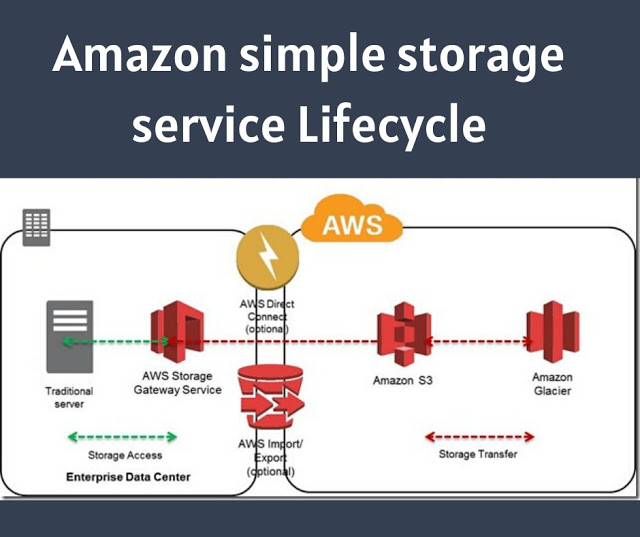
Amazon simple storage service Lifecycle

Amazon simple storage service Lifecycle

Amazon simple storage service Lifecycle offers more than one class of storage for your objects. The class you choose will depend on how critical it is that the data survives no matter what (durability), how quickly you might need to retrieve it (availability), and how much money you have to spend.

1. Durability

S3 measures durability as a percentage. For instance, the 99.999999999 percent durability guarantee for most S3 classes and Amazon Glacier is as follows:
“. . . corresponds to an average annual expected loss of 0.000000001% of objects.
For example, if you store 10,000,000 objects with Amazon S3, you can on average expect to incur a loss of a single object once every 10,000 years.”
Source: https://aws.amazon.com/s3/faqs
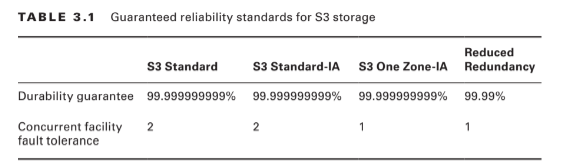
In other words, realistically, there’s pretty much no way that you can possibly lose data stored on one of the standard S3/Glacier platforms because of infrastructure failure. However, it would be irresponsible to rely on your S3 buckets as the only copies of important data. After all, there’s a real chance that a misconfiguration, account lockout, or unanticipated external attack could permanently block access to your data. And, as crazy as it might sound right now, it’s not unthinkable to suggest that AWS could one day go out of business. Kodak and Blockbuster Video once dominated their industries, right? The high durability rates delivered by S3 are largely because they automatically replicate your data across at least three availability zones. That means that even if an entire AWS facility was suddenly wiped off the map, copies of your data would be restored from a different zone. There are, however, two storage classes that aren’t quite so resilient. Amazon S3 One Zone-Infrequent Access (S3 One Zone-IA), as the name suggests, stores data in only a single availability zone. Reduced Redundancy Storage (RRS) is rated at only 99.99 percent durability (because it’s replicated across fewer servers than other classes). You can balance increased/decreased durability against other features like availability and cost to get the balance that’s right for you. All S3 durability levels are shown in Table 3.1.

2. Availability

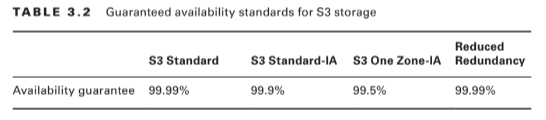
Object availability is also measured as a percentage, this time though, it’s the percentage you can expect a given object to be instantly available on request through the course of a full year. The Amazon S3 Standard class, for example, guarantees that your data will be ready whenever you need it (meaning: it will be available) for 99.99% of the year. That means there will be less than nine hours each year of down time. If you feel down-time has exceeded that limit within a single year, you can apply for a service credit. Amazon’s durability guarantee, by contrast, is designed to provide 99.999999999% data protection. This means there’s practically no chance your data will be lost, even if you might sometimes not have instance access to it. Table 3.2 illustrates the availability guarantees for all S3 classes.

3. Eventually Consistent Data

It’s important to bear in mind that S3 replicates data across multiple locations. As a result, there might be brief delays while updates to existing objects propagate across the system. Uploading a new version of a file or, alternatively, deleting an old file altogether can result in one site reflecting the new state with another still unaware of any changes. To ensure that there’s never a conflict between versions of a single object—which could lead to serious data and application corruption—you should treat your data according to an Eventually Consistent standard. That is, you should expect a delay (usually just two seconds or less) and design your operations accordingly. Because there isn’t the risk of corruption, S3 provides read-after-write consistency for the creation (PUT) of new objects.

Also Read : Amazon Simple Storage Service
Related Product : AWS Certified Solutions Architect | Associate

4. S3 Object Lifecycle

Many of the S3 workloads you’ll launch will probably involve backup archives. But the thing about backup archives is that, when properly designed, they’re usually followed regularly by more backup archives. Maintaining some previous archive versions is critical, but you’ll also want to retire and delete older versions to keep a lid on your storage costs. S3 lets you automate all this with its versioning and lifecycle features.

5. Versioning

Within many file system environments, saving a file using the same name and location as a pre-existing file will overwrite the original object. That ensures you’ll always have the most recent version available to you, but you will lose access to older versions—including versions that were overwritten by mistake. By default, objects on S3 work the same way. But if you enable versioning at the bucket level, then older overwritten copies of an object will be saved and remain accessible indefinitely. This solves the problem of accidentally losing old data, but it replaces it with the potential for archive bloat. Here’s where lifecycle management can help.

6. Lifecycle Management

You can configure lifecycle rules for a bucket that will automatically transition an object’s storage class after a set number of days. You might, for instance, have new objects remain in the S3 Standard class for their first 30 days after which they’re moved to the cheaper One Zone IA for another 30 days. If regulatory compliance requires that you maintain older versions, your fi les could then be moved to the low-cost, long-term storage service Glacier for 365 more days before being permanently deleted.

Accessing S3 Objects

If you didn’t think you’d ever need your data, you wouldn’t go to the trouble of saving it to S3. So, you’ll need to understand how to access your S3-hosted objects and, just as important, how to restrict access to only those requests that match your business and security needs.

7. Access Control

Out of the box, new S3 buckets and objects will be fully accessible to your account but to no other AWS accounts or external visitors. You can strategically open up access at the bucket and object levels using access control list (ACL) rules, finer-grained S3 bucket policies, or Identity and Access Management (IAM) policies. There is more than a little overlap between those three approaches. In fact, ACLs are really leftovers from before AWS created IAM. As a rule, Amazon recommends applying S3 bucket policies or IAM policies instead of ACLs. S3 bucket policies—which are formatted as JSON text and attached to your S3 bucket— will make sense for cases where you want to control access to a single S3 bucket for multiple external accounts and users. On the other hand, IAM policies—because they exist at the account level within IAM—will probably make sense when you’re trying to control the way individual users and roles access multiple resources, including S3. The following code is an example of an S3 bucket policy that allows both the root user and the user Steve from the specified AWS account to access the S3 MyBucket bucket and its contents.

Read More : https://www.info-savvy.com/aws-elastic-block-storage-volumes-and-its-features/

———————————————————————————————————————————-

This Blog Article is posted by

Infosavvy, 2nd Floor, Sai Niketan, Chandavalkar Road Opp. Gora Gandhi Hotel, Above Jumbo King, beside Speakwell Institute, Borivali West, Mumbai, Maharashtra 400092

Contact us – www.info-savvy.com

AWS

Amazon Simple Storage Service

Amazon Simple Storage Service (S3) is where individuals, applications, and a long list of AWS services keep their data.It’s an excellent platform for the following:– Maintaining backup archives, log files, and disaster recovery images
– Running analytics on big data at rest
– Hosting static websites S3 provides inexpensive and reliable storage that can, if necessary, be closely integrated with operations running within or external to Amazon web services.

This isn’t the same as the operating system volumes you learned about in the previous chapter: those are kept on the block storage volumes driving your EC2 instances. S3, by contrast, provides a space for effectively unlimited object storage. What the difference is between object and block storage? With block-level storage, data on a raw physical storage device is divided into individual blocks whose use is managed by a file system. NTFS is a common file system used by Windows, while Linux might use Btrfs or ext4. The file system, on behalf of the installed OS, is responsible for allocating space for the files and data that are saved to the underlying device and for providing access whenever the OS needs to read some data. An object storage system like S3, on the other hand, provides what you can think of as a flat surface on which to store your data. This simple design avoids some of the OS-related complications of block storage and allows anyone easy access to any amount of professionally designed and maintained storage capacity. When you write files to S3, they’re stored along with up to 2 KB of metadata. The metadata is made up of keys that establish system details like data permissions and the appearance of a file system location within nested buckets.

Through the rest of this chapter, you’re going to learn the following:

– How S3 objects are saved, managed, and accessed
– How to choose from among the various classes of storage to get the right balance of durability, availability, and cost
– How to manage long-term data storage lifecycles by incorporating Amazon Glacier into your design
– What other Amazon web services exist to help you with your data storage and access operations

S3 Service Architecture

You organize your S3 files into buckets. By default, you’re allowed to create as many as 100 buckets for each of your AWS accounts. As with other AWS services, you can ask AWS to raise that limit. Although an S3 bucket and its contents exist within only a single AWS region, the name you choose for your bucket must be globally unique within the entire S3 system. There’s some logic to this: you’ll often want your data located in a particular geographical region to satisfy operational or regulatory needs. But at the same time, being able to reference a bucket without having to specify its region simplifies the process.

Prefixes and Delimiters

As you’ve seen, S3 stores objects within a bucket on a flat surface without subfolder hierarchies. However, you can use prefixes and delimiters to give your buckets the appearance of a more structured organization. A prefix is a common text string that indicates an organization level. For example, the word contracts when followed by the delimiter / would tell S3 to treat a file with a name like contracts/acme.pdf as an object that should be grouped together with a second file named contracts/dynamic.pdf. S3 recognizes folder/directory structures as they’re uploaded and emulates their hierarchical design within the bucket, automatically converting slashes to delimiters. That’s why you’ll see the correct folders whenever you view your S3-based objects through the console or the API

Working with Large Objects

While there’s no theoretical limit to the total amount of data you can store within a bucket, a single object may be no larger than 5 TB. Individual uploads can be no larger than 5 GB. To reduce the risk of data loss or aborted uploads, AWS recommends that you use a feature called Multipart Upload for any object larger than 100 MB. As the name suggests, Multipart Upload breaks a large object into multiple smaller parts and transmits them individually to their S3 target. If one transmission should fail, it can be repeated without impacting the others. Multipart Upload will be used automatically when the upload is initiated by the AWS CLI or a high-level API, but you’ll need to manually break up your object if you’re working with a low-level API. An application programming interface (API) is a programmatic interface through which operations can be run through code or from the command line. AWS maintains APIs as the primary method of administration for each of its services. AWS provides low-level APIs for cases when your S3 uploads require hands-on customization, and it provides high-level APIs for operations that can be more readily automated. This page contains specifics: https://docs.aws.amazon.com/AmazonS3/latest/dev/uploadobjusingmpu.html

Encryption

Unless it’s intended to be publicly available—perhaps as part of a website—data stored on S3 should always be encrypted. You can use encryption keys to protect your data while it’s at rest within S3 and—by using only Amazon’s encrypted API endpoints for data transfers— protect data during its journeys between S3 and other locations. Data at rest can be protected using either server-side or client-side encryption.

Server-Side Encryption

– The “server-side” here is the S3 platform, and it involves having AWS encrypt your data objects as they’re saved to disk and decrypt them when you send properly authenticated requests for retrieval. You can use one of three encryption options
– Server-Side Encryption with Amazon S3-Managed Keys (SSE-S3), where AWS uses its own enterprise-standard keys to manage every step of the encryption and decryption process
– Server-Side Encryption with AWS KMS-Managed Keys (SSE-KMS), where, beyond the SSE-S3 features, the use of an envelope key is added along with a full audit trail for tracking key usage. You can optionally import your own keys through the AWS KMS service.
– Server-Side Encryption with Customer-Provided Keys (SSE-C), which lets you provide your own keys for S3 to apply to its encryption

Client-Side Encryption

It’s also possible to encrypt data before it’s transferred to S3. This can be done using an AWS KMS–Managed Customer Master Key (CMK), which produces a unique key for each object before it’s uploaded. You can also use a Client-Side Master Key, which you provide through the Amazon S3 encryption client. Server-side encryption can greatly reduce the complexity of the process and is often preferred. Nevertheless, in some cases, your company (or regulatory oversight body) might require that you maintain full control over your encryption keys, leaving client-side as the only option.

Read More : https://www.info-savvy.com/amazon-simple-storage-service/

————————————————————————————————————

This Blog Article is posted by

Infosavvy, 2nd Floor, Sai Niketan, Chandavalkar Road Opp. Gora Gandhi Hotel, Above Jumbo King, beside Speakwell Institute, Borivali West, Mumbai, Maharashtra 400092

Contact us – www.info-savvy.com
AWS

AWS Elastic Block Storage Volumes and It’s Features

You will learn in this blog AWS EC2 Storage Volumes, Elastic Block Store Volumes, EBS-Provisioned IOPS SSD, EBS General-Purpose SSD, Throughput-Optimized HDD and Cold HDD etc.

EC2 Storage Volumes

Storage drives are for the most part virtualized spaces carved out of larger physical drives. To the OS running on your instance, though, all AWS volumes will present themselves exactly as though they were normal physical drives. But there’s actually more than one kind of AWS volume, and it’s important to understand how each type works.

Elastic Block Store Volumes

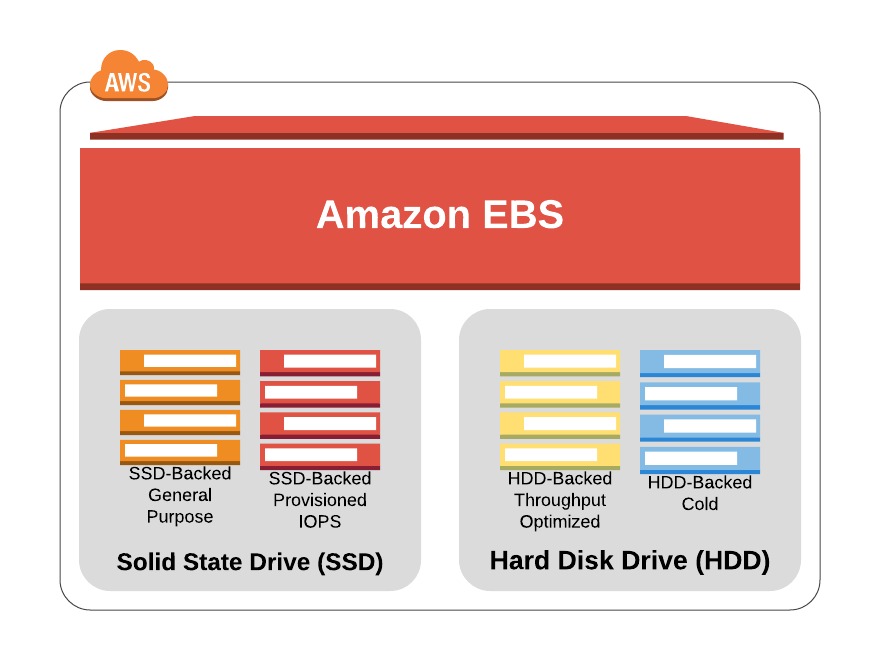
You can attach as many Elastic Block Store (EBS) volumes to your instance as you like and use them just as you would as you would hard drives, flash drives, or USB drives with your physical server. And as with physical drives, the type of EBS volume you choose will have an impact on both performance and cost. The AWS SLA guarantees the reliability of the data you store on its EBS volumes (promising at least 99.999 percent availability), so you don’t have to worry about failure. When an EBS drive does fail, its data has already been duplicated and will probably be brought back online before anyone notices a problem. So, practically, the only thing that should concern you is how quickly and efficiently you can access your data. There are currently four EBS volume types, two using solid-state drive (SSD) technologies and two using the older spinning hard drives (HDDs). The performance of each volume type is measured in maximum IOPS/volume (where IOPS means input/output operations per second).

EBS-Provisioned IOPS SSD

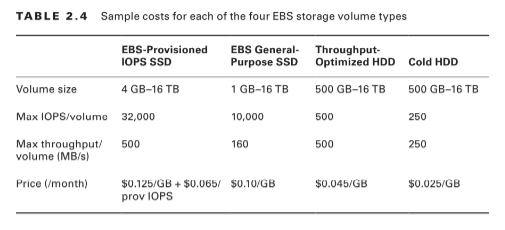
If your applications will require intense rates of I/O operations, then you should consider provisioned IOPS, which provides a maximum IOPS/volume of 32,000 and a maximum throughput/volume of 500 MB/s. Provisioned IOPS—which in some contexts is referred to as EBS Optimized—can cost $0.125/GB/month in addition to $0.065/provisioned IOPS.

EBS General-Purpose SSD

For most regular server workloads that, ideally, deliver low-latency performance, general purpose SSDs will work well. You’ll get a maximum of 10,000 IOPS/volume, and it’ll cost you $0.10/GB/month. For reference, a general-purpose SSD used as a typical 8 GB boot drive for a Linux instance would, at current rates, cost you $9.60/year.

Throughput-Optimized HDD

Throughput-optimized HDD volumes can provide reduced costs with acceptable performance where you’re looking for throughput-intensive workloads including log processing and big data operations. These volumes can deliver only 500 IOPS/volume but with a 500 MB/s maximum throughput/volume, and they’ll cost you only $0.045/GB/month.

Cold HDD

When you’re working with larger volumes of data that require only infrequent access, a 250 IOPS/volume type might meet your needs for only $0.025/GB/month. Table 2.4 lets you compare the basic specifications and estimated costs of those types.Tab le 2.4 Sample costs for each of the four EBS storage volume types

EBS Volume Features

All EBS volumes can be copied by creating a snapshot. Existing snapshots can be used to generate other volumes that can be shared and/or attached to other instances or converted to images from which AMIs can be made. You can also generate an AMI image directly from a running instance-attached EBS volume—although, to be sure no data is lost, it’s best to shut down the instance first. EBS volumes can be encrypted to protect their data while at rest or as it’s sent back and forth to the EC2 host instance. EBS can manage the encryption keys automatically behind the scenes or use keys that you provide through the AWS Key Management Service (KMS). Exercise 2.4 will walk you through launching a new instance based on an existing snapshot image.

Instance Store Volumes Unlike

EBS volumes, instance store volumes are ephemeral. This means that when the instances they’re attached to are shut down, their data is permanently lost. So, why would you want to keep your data on an instance store volume more than on EBS?– Instance store volumes are SSDs that are physically attached to the server hosting your instance and are connected via a fast NVMe interface. – The use of instance store volumes is included in the price of the instance itself. – Instance store volumes work especially well for deployment models where instances are launched to fill short-term roles (as part of autoscaling groups, for instance), import data from external sources, and are, effectively, disposable. Whether one or more instance store volumes are available for your instance will depend on the instance type you choose. This is an important consideration to take into account when planning your deployment. Even with all the benefits of EBS and instance storage, it’s worth noting that there will be cases where you’re much better off keeping large data sets outside of EC2 altogether. For many use cases, Amazon’s S3 service can be a dramatically less expensive way to store files or even databases that are nevertheless instantly available for compute operations. You’ll learn more about this in Chapter 3, “Amazon Simple Storage Service and Amazon Glacier Storage.”

Accessing Your EC2 Instance

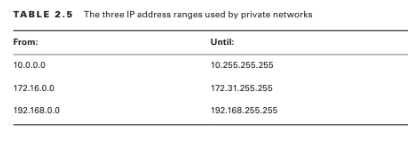
Like all networked devices, EC2 instances are identified by unique IP addresses. All instances are assigned at least one private IPv4 address that, by default, will fall within one of the blocks shown in Table 2.5.

Out of the box, you’ll only be able to connect to your instance from within its subnet, and the instance will have no direct contact to the Internet. If your instance configuration calls for multiple network interfaces (to connect to otherwise unreachable resources), you can create and then attach one or more virtual Elastic Network Interfaces to your instance. Each of these interfaces must be connected to an existing subnet and security group. You can optionally assign a static IP address within the subnet range. Of course, an instance can also be assigned a public IP through which full Internet access is possible. As you learned earlier as part of the instance lifecycle discussion, the default public IP assigned to your instance is ephemeral and probably won’t survive a reboot.

Read More : https://www.info-savvy.com/aws-elastic-block-storage-volumes-and-its-features/

————————————————————————————————————

This Blog Article is posted by

Infosavvy, 2nd Floor, Sai Niketan, Chandavalkar Road Opp. Gora Gandhi Hotel, Above Jumbo King, beside Speakwell Institute, Borivali West, Mumbai, Maharashtra 400092

Contact us – www.info-savvy.com
AWS

AWS Configuring Instance Behaviour and Instance Lifecycle

In this blog you will learn Configuring an Environment Instance, AWS Regions, Tenancy , Configuring Instance Behaviour and Instance Lifecycle.

Configuring an Environment for Your Instance

Deciding where your EC2 instance will live is as important as choosing a performance configuration. Here, there are three primary details to get right: geographic region, virtual private cloud (VPC), and tenancy model.

AWS Regions

As you learned earlier, AWS servers are housed in data centers around the world and organized by geographical region. You’ll generally want to launch an EC2 instance in the region that’s physically closest to the majority of your customers or, if you’re working with data that’s subject to legal restrictions, within a jurisdiction that meets your compliance needs. EC2 resources can be managed only when you’re “located within” their region. You set the active region in the console through the drop-down menu at the top of the page and through default configuration values in the AWS CLI or your SDK. You can update your CLI configuration by running aws configure. Bear in mind that the costs and even functionality of services and features might vary between regions. It’s always a good idea to consult the most up-to-date official documentation.

VPCs

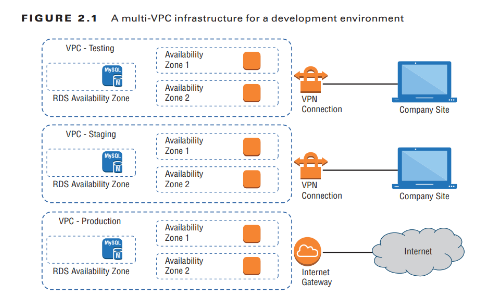
Virtual private clouds (VPCs) are easy-to-use AWS network organizers and great tools for organizing your infrastructure. Because it’s so easy to isolate the instances in one VPC from whatever else you have running, you might want to create a new VPC for each one of your projects or project stages. For example, you might have one VPC for early application development, another for beta testing, and a third for production (see Figure 2.1).

Adding a simple VPC that doesn’t incorporate a NAT gateway won’t cost you anything. You’ll learn much more about all this in , “Amazon Virtual Private Cloud.”

Tenancy

When launching an EC2 instance, you’ll have the opportunity to choose a tenancy model. The default setting is shared tenancy, where your instance will run as a virtual machine on a physical server that’s concurrently hosting other instances. Those other instances might well be owned and operated by other AWS customers, although the possibility of any kind of insecure interaction between instances is remote.
To meet special regulatory requirements, your organization’s instances might need an extra level of isolation. The Dedicated Instance option ensures that your instance will run on its own dedicated physical server. This means that it won’t be sharing the server with resources owned by a different customer account. The Dedicated Host option allows you to actually identify and control the physical server you’ve been assigned to meet more restrictive licensing or regulatory requirements.

Configuring Instance Behaviour

You can optionally tell EC2 to execute commands on your instance as it boots by pointing to user data in your instance configuration (this is sometimes known as bootstrapping). Whether you specify the data during the console configuration process or by using the –user-data value with the AWS CLI, you can have script files bring your instance to any desired state. User data can consist of a few simple commands to install a web server and populate its web root, or it can be a sophisticated script setting the instance up as a working node within a Puppet Enterprise–driven platform.

Instance Pricing

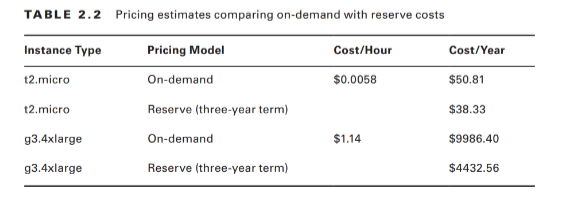
Use of EC2 instances can be purchased using one of three models. For always-on deployments that you expect to run for less than 12 months, you’ll normally pay for each hour your instance is running through the on-demand model. On-demand is the most flexible way to consume EC2 resources since you’re able to closely control how much you pay by stopping and starting your instances according to your need. But, per hour, it’s also the most expensive. If you’re planning to keep the lights burning 24/7 for more than a year, then you’ll enjoy a significant discount by purchasing a reserve instance—generally over a term commitment of between one and three years. You can pay up front for the entire term of a reserve instance or, for incrementally higher rates, either partially up front and the rest in monthly charges or entirely through monthly charges. Table 2.2 gives you a sense of how costs can change between models. These estimates assume a Linux platform, all up-front payments, and default tenancy. Actual costs may vary over time and between regions.

For workloads that can withstand unexpected disruption (like computation-intensive genome research applications), purchasing instances on Amazon’s Spot market can save you a lot of money. The idea is that you enter a maximum dollar-value bid for an instance type running in a particular region. The next time an instance in that region becomes available at a per-hour rate that’s equal to or below your bid, it’ll be launched using the AMI and launch template you specified. Once up, the instance will keep running either until you stop it—when your workload completes, for example—or until the instance’s per-hour rate rises above your maximum bid. You’ll learn more about the spot market and reserve instances in “The Cost Optimization Pillar.” It will often make sense to combine multiple models within a single application infrastructure. An online store might, for instance, purchase one or two reserve instances to cover its normal customer demand but also allow autoscaling to automatically launch on-demand instances during periods of unusually high demand. Use Exercise 2.3 to dive deeper into EC2 pricing.

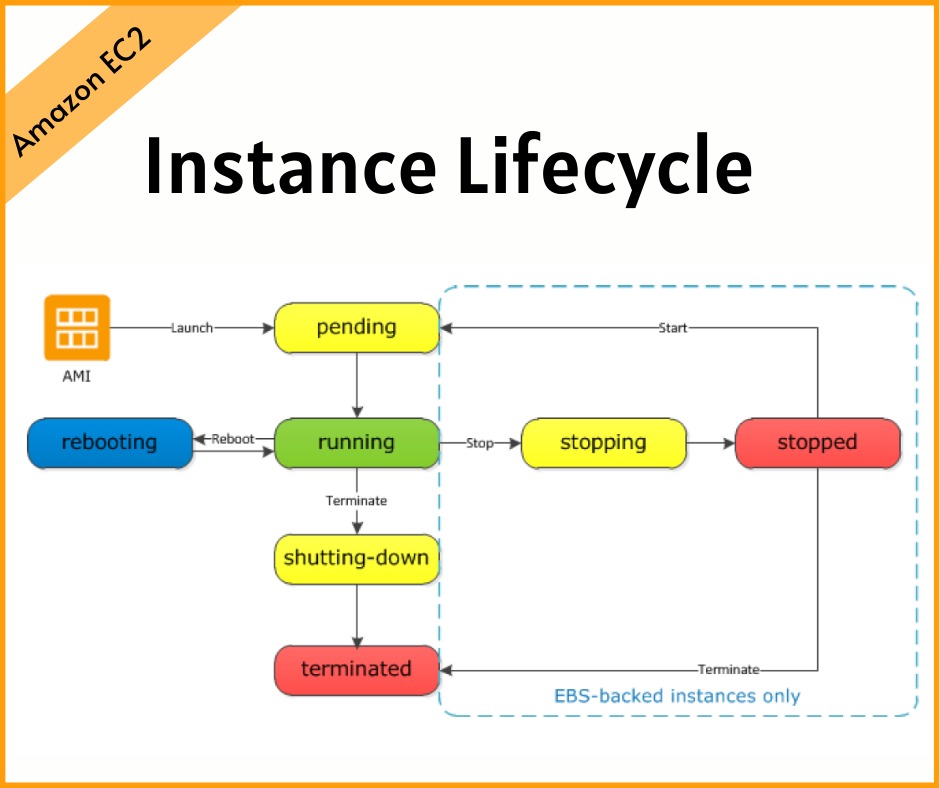
Instance Lifecycle

The state of a running EC2 instance can be managed in a number of ways. Terminating the instance will shut it down and cause its resources to be reallocated to the general AWS pool.
If your instance won’t be needed for some time but you don’t want to terminate it, you can save money by simply stopping it and then restarting it when it’s needed again. The data on an EBS volume will in this case not be lost, although that would not be true for an instance volume. Later in this chapter, you’ll learn about both EBS and instance store volumes and the ways they work with EC2 instances.

You should be aware that a stopped instance that had been using a non-persistent public IP address will most likely be assigned a different address when it’s restarted. If you need a predictable IP address that can survive restarts, allocate an Elastic IP address and associate it with your instance. You can edit or change an instance’s security group (which I’ll discuss a bit later in this chapter) to update access policies at any time—even while an instance is running. You can also change its instance type to increase or decrease its compute, memory, and storage capacity (just try doing that on a physical server). You will need to stop the instance, change the type, and then restart it.

Read More : https://www.info-savvy.com/aws-configuring-instance-behaviour-and-instance-lifecycle/

————————————————————————————————————

This Blog Article is posted by

Infosavvy, 2nd Floor, Sai Niketan, Chandavalkar Road Opp. Gora Gandhi Hotel, Above Jumbo King, beside Speakwell Institute, Borivali West, Mumbai, Maharashtra 400092

Contact us – www.info-savvy.com